Design Notes
Background on why the daily-dose app/package is shaped the way it is. For instructions, see the Tutorials or How-to Guides. For exact signatures, see Reference.
How a workout gets from source to screen
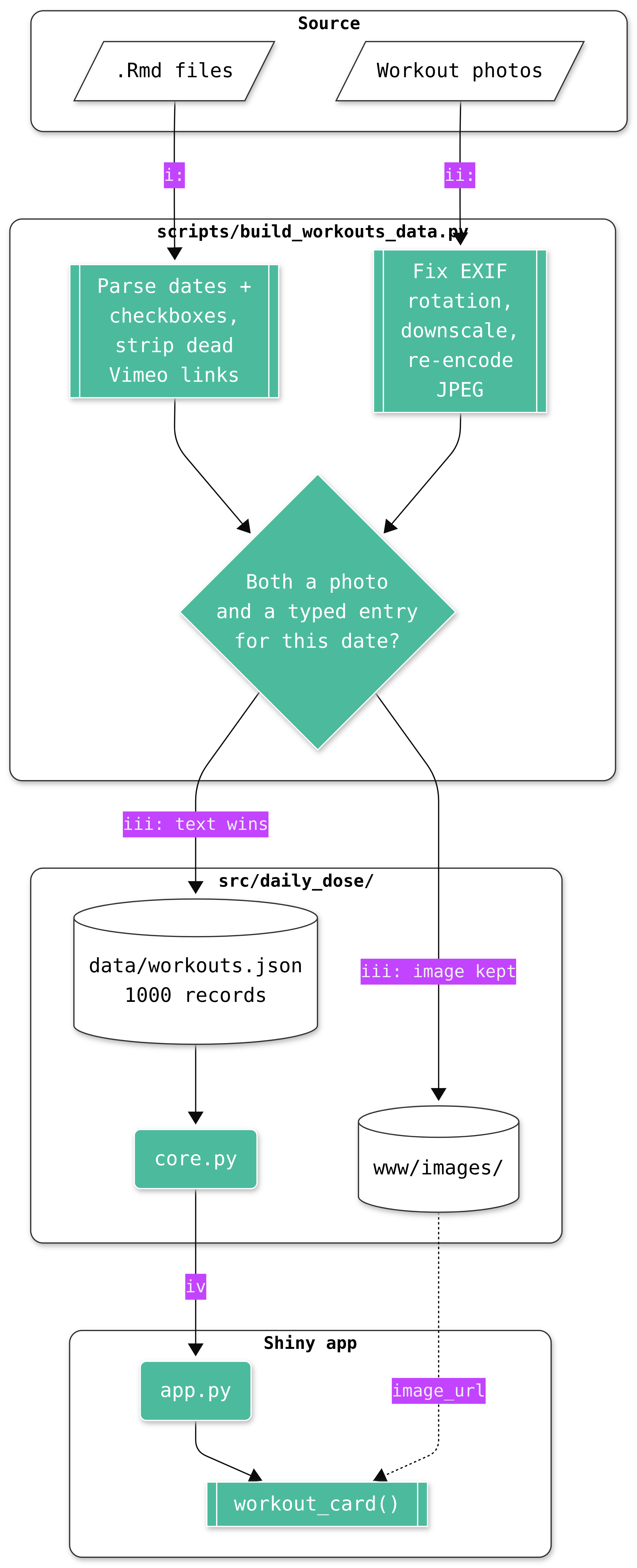
The sections below explain the decisions in this pipeline. This diagram tries to capture the whole thing:
Why just two features
I built the original site using R Markdown with a page per year, a Notes page, and a Dev page. When I convert it to a Python app, I kept the two things that make the personal workout log worth opening (a random pick, and “what did I do on this day before”) instead of rebuilding a year-by-year browser nobody was asking for.
The Notes (training principles) and Dev (untested workout drafts, never real dated entries) were dropped for the same reason: neither is a workout, so neither belongs in a random pick or an on-this-day match.
One record shape for two different sources
Roughly 4 years of the history is typed markdown, with a stretch of 2020 as whiteboard photos. Rather than model those as two separate collections, I decided to tread every workout as one record with a date and kind ("text" or "image"), and whichever fields apply to the kind. random_workout() and on_this_day() then both operate on a single flat list without caring what’s inside each record. Only the rendering layer (workout_card()) branches on kind.
Text wins when a date has both
Some 2020 dates turned out to have both a photographed whiteboard and a later typed write-up of the same session. In most cases, the photo was a same-day backup, typed up afterward. Keeping both would mean the same real workout showing up twice under “On This Day,” and “Random Workout” silently double-weighting those dates.
The build script resolves it by preferring the text entry, which is also the richer of the two because it usually includes the rep/set structure the photo doesn’t make searchable.
Recompressing the photos
The original whiteboard photos were uncompressed phone-camera PNGs, some over 10MB each, 325MB total for 120 images. I wrote daily-dose to be a package that can be installed, not just a static site, so carrying that weight into every install wasn’t worth it.
Downscaling and re-encoding as JPEG dropped it to ~21MB, with no visible loss on what’s essentially a photo of handwriting on a whiteboard.
Shiny Core, not Express
The app is one server function wiring two buttons to two pure functions and a render call, small enough that Shiny for Python’s Express terser syntax would save only a few lines. It’s still built with Shiny Core, because core.py has no dependency on Shiny at all, and that’s what makes random_workout() and on_this_day() unit-testable without spinning up a Shiny session (see tests/test_core.py).
That separation is why app.py reads as thin glue rather than as the place the logic lives.
The parser keeps things it can’t fully understand
I spent four years writing down workout, but they don’t use one consistent format for exercises, reps, or footnotes. Forcing that into structured fields would risk silently mangling every entry the parser couldn’t read confidently.
body_md keeps the original markdown for each text entry verbatim and the app renders it as-is. The only fields pulled out are the two that are consistent enough to parse reliably: the date and the done-checkbox.
(Entries originally linked out to Vimeo for a video of the workout; that account is gone and every one of those links is now dead, so the build script unwraps them back down to plain text instead of shipping broken links.)
One date heading did break this: 2022-01-29 was written indented under the entry above it (2022-01-30), so the original parser’s heading pattern, which only matched an unindented ### YYYY-MM-DD, missed it and folded its text into 2022-01-30’s entry instead of starting a new one. Two things fixed it: the heading pattern now allows leading whitespace, and the parser also checks a looser, date-shaped pattern against every line, raising if something matches that looser check but not the strict one. A future heading the parser genuinely can’t handle now stops the build instead of silently merging into whatever entry came before it.
The root app.py and requirements.txt
pyproject.toml is the real source of truth for dependencies, and local development never touches either root file. They exist only because Posit Connect Cloud deploys by convention rather than configuration.
Connect Cloud looks for an app.py at the repo root and installs from requirements.txt, full stop, with no way to point it at src/daily_dose/app.py or pyproject.toml instead.
Restructuring the package around one deployment target’s assumptions didn’t seem worth it. Instead, app.py is a small shim and requirements.txt holds real dependency lines mirroring pyproject.toml’s [project.dependencies] by hand.
The first approach was requirements.txt containing just -e ., an editable install of the package from pyproject.toml, which kept the two files’ content in sync automatically. That broke in production because Connect Cloud’s dependency resolver doesn’t run pip install, so it can’t interpret -e . and fails before installing anything at all (Error determining requirements: / does not appear to be a Python project).
Since daily_dose is never actually installed there either way, app.py puts src/ on sys.path directly rather than relying on an install step to make the import work. The duplication is now in file content, not just file existence (a dependency added to pyproject.toml needs the same line added to requirements.txt by hand).