Getting started
Prerequisites
- Python 3.10 or newer.
- An internet connection (the first search downloads a season roster from the MLB Stats API).
Install
Clone the repository, then create and activate a virtual environment (required on Debian/Ubuntu and other externally-managed Python installs — .venv/ is already git-ignored):
python3 -m venv .venv
source .venv/bin/activate
Install in editable mode with the development extras:
pip install -e ".[dev]"Run
Start the Shiny server:
baseball-trajectoryThe app binds to 127.0.0.1:8000. Open http://127.0.0.1:8000 in a browser.
Your first trajectory
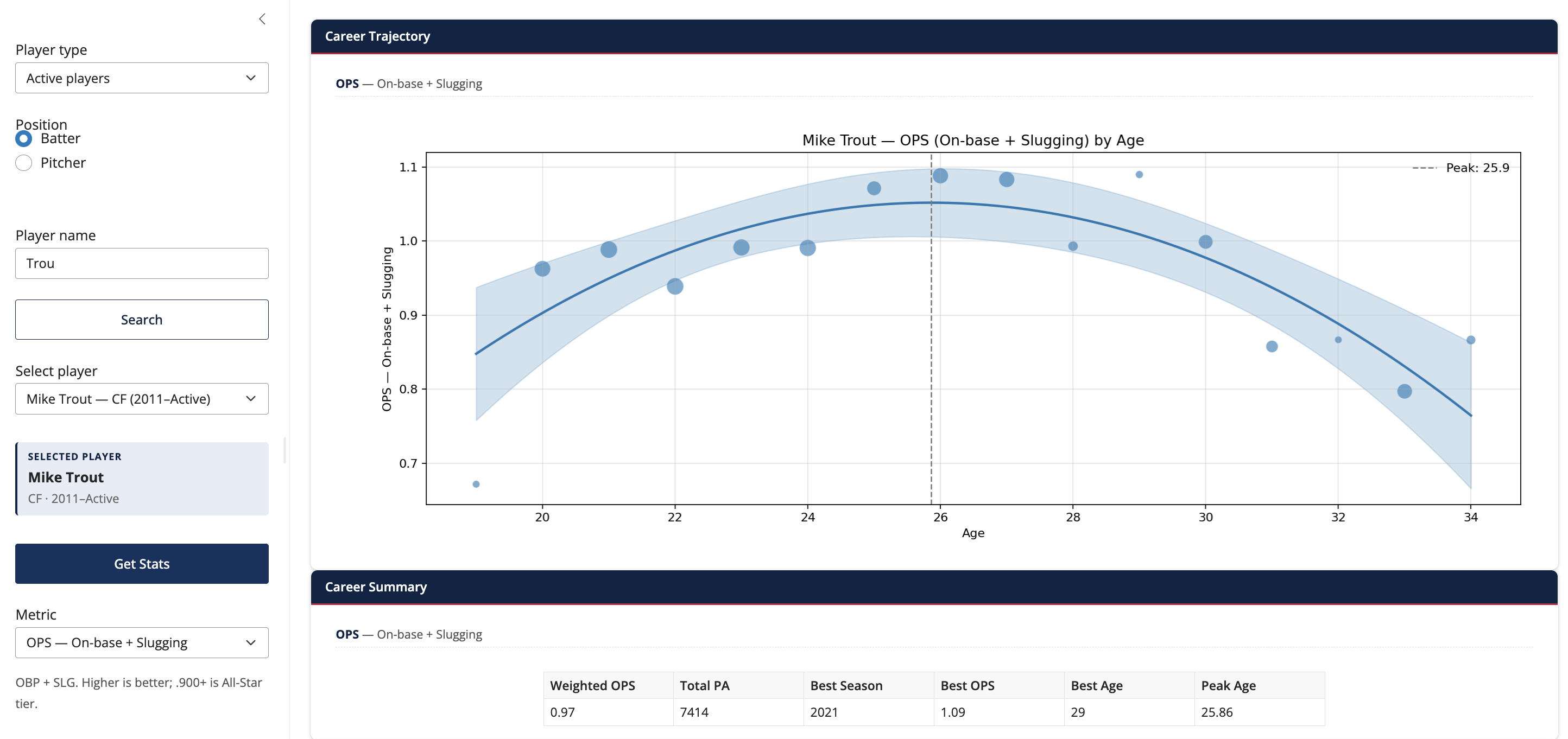
- Leave Player type on Active players and Position on Batter (the defaults).
- Type
Troutin the Player name box. The dropdown populates with matches as you type — each row shows the player’s position, e.g. Mike Trout — CF (2011–Active). - Pick Mike Trout in the dropdown. A small info card appears confirming the pick (full name, position, debut–final seasons).
- Click Get Stats. The trajectory plot, career summary, and season log fill in.
- Try changing Metric from
OPS — On-base + SluggingtoHR — Home runsto see his home-run arc.
Looking up a retiree
Toggle Player type to Retired players, then type e.g. Griffey or Ryan. The auto-typeahead window widens to ~50 seasons in this mode, so older retirees come up directly. If a name still doesn’t appear, click the Search button to do an even deeper lookup. See the User guide for the full workflow.
Stopping the server
Press Ctrl-C in the terminal where baseball-trajectory is running.
Next
- Read the User guide for the full sidebar walkthrough, including how to look up older retired players.
- See the Deployment page if you want to host the app yourself (Posit Connect Cloud, Docker, etc.).