Shell Audit Feedback Loop
Background and reasoning behind design decisions in splam. This page won’t tell you how to do something. See How-To: Shell Audit Setup for that.
The loop splam doesn’t close
Almost every service incident an admin handles follows the same three steps: 1) diagnose (grep, journalctl, systemctl status), 2) fix (a shell command, almost always run with sudo), 3) confirm (restart or reload, then re-check the logs and status). Explanation: Audit Trail Scope already draws the line around what splam’s own trail covers, and “systemctl from a shell” is explicitly on the not captured side of that line. That’s the fix step, and it’s also the step worth keeping.
The diagnose step leaves a trail already, in journalctl and whatever the Logs tab shows. The confirm step is usually re-running the same commands from the diagnosis. The fix is the one piece of the loop that’s pure signal (i.e., the specific command that turned a broken state into a working one), and right now it lives nowhere but a shell history file (per-user, unstructured, not tied to the incident) or the admin’s memory.
redact(), incidents.py, manage_incidents.py, and shell_notify.py capture the fix step reliably, link it with its diagnose/confirm counterparts, and turn all three into something readable. That’s a working-to-learning feedback loop instead of a one-time fix that has to be rediscovered next time.
Candidate sources for shell activity
Three places on the OS actually see what ran; they’re not equivalent.
sudo logfiles
sudo’s own logfile (Defaults logfile="/var/log/sudo.log" in sudoers) is the simplest: one plain-text line per invocation, already the format we want. Its blind spot is anything that isn’t a direct sudo <command>: drop into sudo -i or an existing root shell and only the first line gets logged, not what’s typed after. It’s also self-defeating as a control: the same root access it’s meant to record is enough to turn it off.
sudo I/O logging
sudo I/O logging (Defaults log_input,log_output plus an iolog_dir) records the full terminal session and can be replayed with sudoreplay. It sees everything the logfile misses, but that’s also the problem: a fix command sits in a transcript along with every ls, typo, and page through less. Useful for a full session replay if one incident ever needs it; too noisy to be the primary source for a curated record.
asciinema
asciinema rec is the same idea as sudo I/O logging, a full PTY transcript, in different packaging, and it inherits the same noise problem. It also loses ground on three points that matter here. It’s manually invoked, with no built-in way to force it for every session; the closest the community gets is wrapping a login shell, which is openly documented as bypassable by switching shells (the same reasoning that already put auditd ahead of the sudo logfile). Its only redaction is a live mute hotkey the admin has to remember to press before typing something sensitive, the opposite of not depending on anyone remembering anything. And its output, asciicast, is JSON Lines with raw terminal escape sequences embedded in each event, not plain text and not markdown; it needs a player to be readable at all, which was the original problem this whole page exists to solve. It adds a third-party tool for a capability sudo I/O logging already covers, and covers less reliably.
auditd
auditd, watching execve at the kernel level (-a always,exit -F arch=b64 -S execve -F euid=0 -k splam-shell), sees every process a root-privileged user execs, regardless of whether it went through sudo, su, or a shell that was already root. It’s also the one of the three that’s already load-bearing in splam: the Tasks tab’s own auditd.service notes call it out as the technical control usually satisfying 21 CFR Part 11 audit-trail requirements at the OS level, and say changes to its rules should go through change control rather than a self-review. That’s the tamper-resistance argument for using it here too, because disabling auditd is itself the kind of event that’s supposed to get noticed. The downside is that audit.log is dense and keyed for machines, not admins, so it needs ausearch -k splam-shell (or direct parsing) before a human (or a parser) can make sense of it.
auditd is the source of record. The sudo logfile is worth turning on too, as a second, much simpler line to cross-check against. sudo I/O logging and asciinema both stay off; if full session replay is ever actually needed, sudo I/O logging is the one to reach for, since it’s already the lower-friction option of the two.
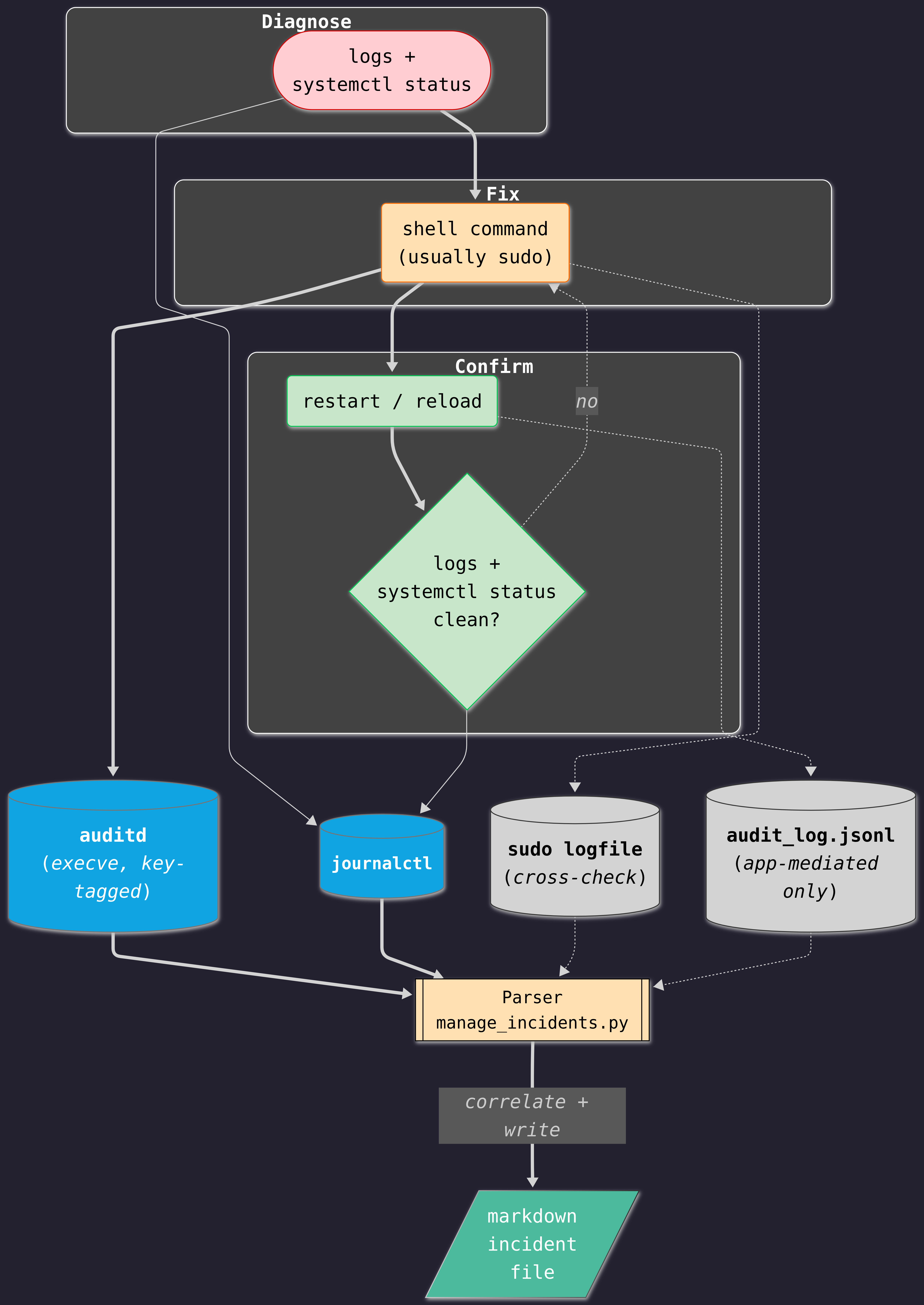
The dotted lines mark what’s optional or secondary: the sudo logfile is a cross-check, not the source of record; audit_log.jsonl only has something to contribute when the confirm step happened to go through splam itself rather than a bare systemctl on the shell.
What runs, and when
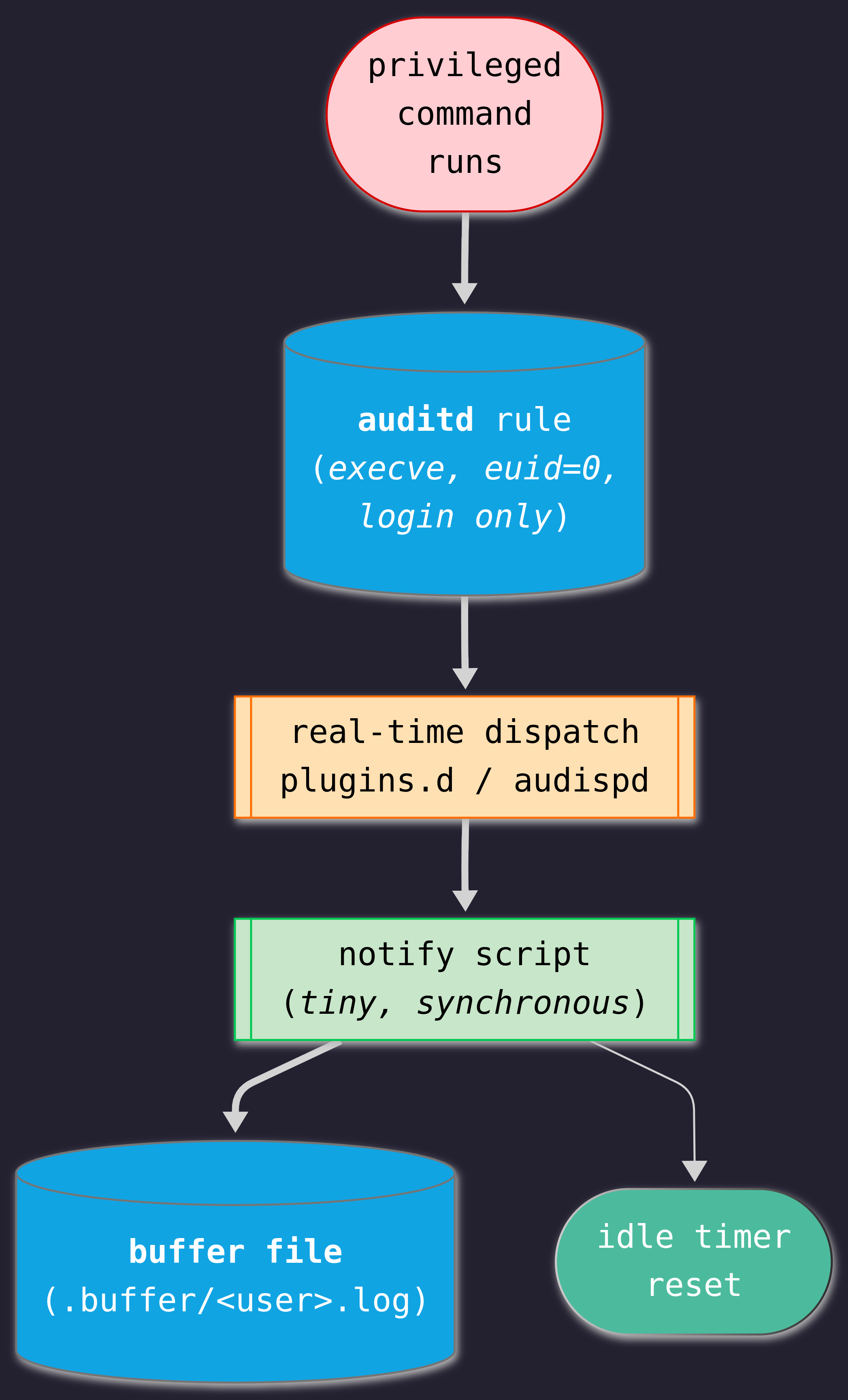
Reading audit.log after the fact (ausearch -k splam-shell) would work, but it means polling for something that already happened. auditd can do better than that: it supports dispatching matched events to a script in real time as they occur, which turns capture from a periodic sweep into something that happens the moment a tagged command runs. That splits the “parser” from the diagram above into two pieces with very different jobs: something tiny that fires on every event (capture), and something slower that decides when a run of events is done and writes it up (correlate-and-write, referred to as “the parser” for the rest of this page).
The two flowcharts below each cover one piece in isolation. What they don’t show is the timing between them, an admin’s commands arriving one at a time while the buffer just sits there, until something (a timer, or the admin) decides the window is over:
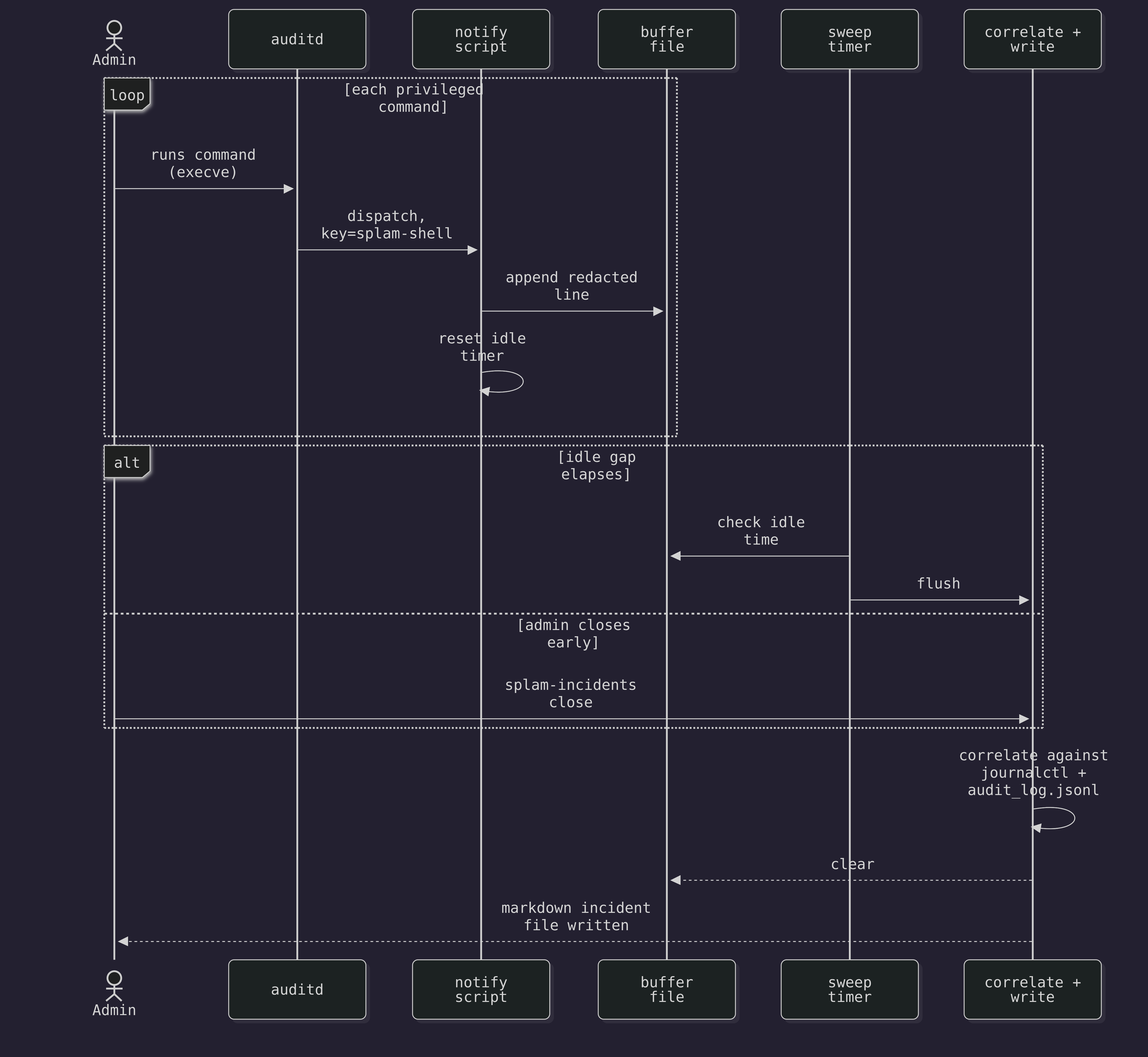
Everything above the alt can repeat any number of times, for any number of commands, before either branch fires exactly once to close the window.
Capturing in real time
Every execve that matches the splam-shell rule gets dispatched to shell_notify.py the moment it happens. auditd spawns it once, at daemon startup, and streams matching records to its stdin for the life of the process (it isn’t re-invoked per event). shell_notify.py has one job and stays small: append the record to a per-user buffer file, and reset an idle timer for that user. Nothing in the fast path resolves a service, reads journalctl, or writes markdown. auditd’s dispatch is synchronous, and a slow script in that path backs up event delivery for every rule, not just this one.
auditd splits one execve into a SYSCALL record, carrying auid and key, and an EXECVE record, carrying the argv, sharing a msg=audit(timestamp:serial): id but arriving as separate lines in no guaranteed order. shell_notify.py’s Correlator holds each id’s pieces in memory until both have arrived, drops anything whose SYSCALL record isn’t tagged key="splam-shell" as soon as that’s known, and ages out whatever’s left after 5 seconds so an event whose other half never shows up doesn’t sit there for the life of the process.
Each line is <ISO timestamp> tab <redacted command>. Nothing fancier: plain text stays greppable if someone opens the buffer directly, and it’s the same shape correlate-and-write parses back apart later.
“Per-user” here means auditd’s auid, the login uid that started the session, not euid or uid. Everything running under sudo has euid=0 regardless of who ran it, so keying on euid would merge every admin’s commands into one indistinguishable bucket. auid survives sudo, which is the only reason .buffer/<user>.log can mean anything.
Deciding when an incident is done
Real-time capture only answers when a command gets recorded, not when a run of them becomes one incident. That boundary decision is a hybrid: idle-gap by default, with an explicit marker to cut a window short on demand.
A periodic sweep (splam-incidents sweep, on a short systemd timer) checks each user’s buffer against SPLAM_INCIDENT_IDLE_GAP: quiet that long, and the buffer is closed and correlated. No admin has to do anything for this to work, which matters, because most fixes end with a restart and a log check, not a deliberate “I’m done now” gesture. But the boundary is still a guess: a slow investigation can look like two incidents, and two quick unrelated ones close together can look like one.
splam-incidents close <user> is the escape hatch: an explicit, on-demand flush that doesn’t wait for the idle gap, for the times the guess would be wrong and an admin knows the exact moment the fix ended.
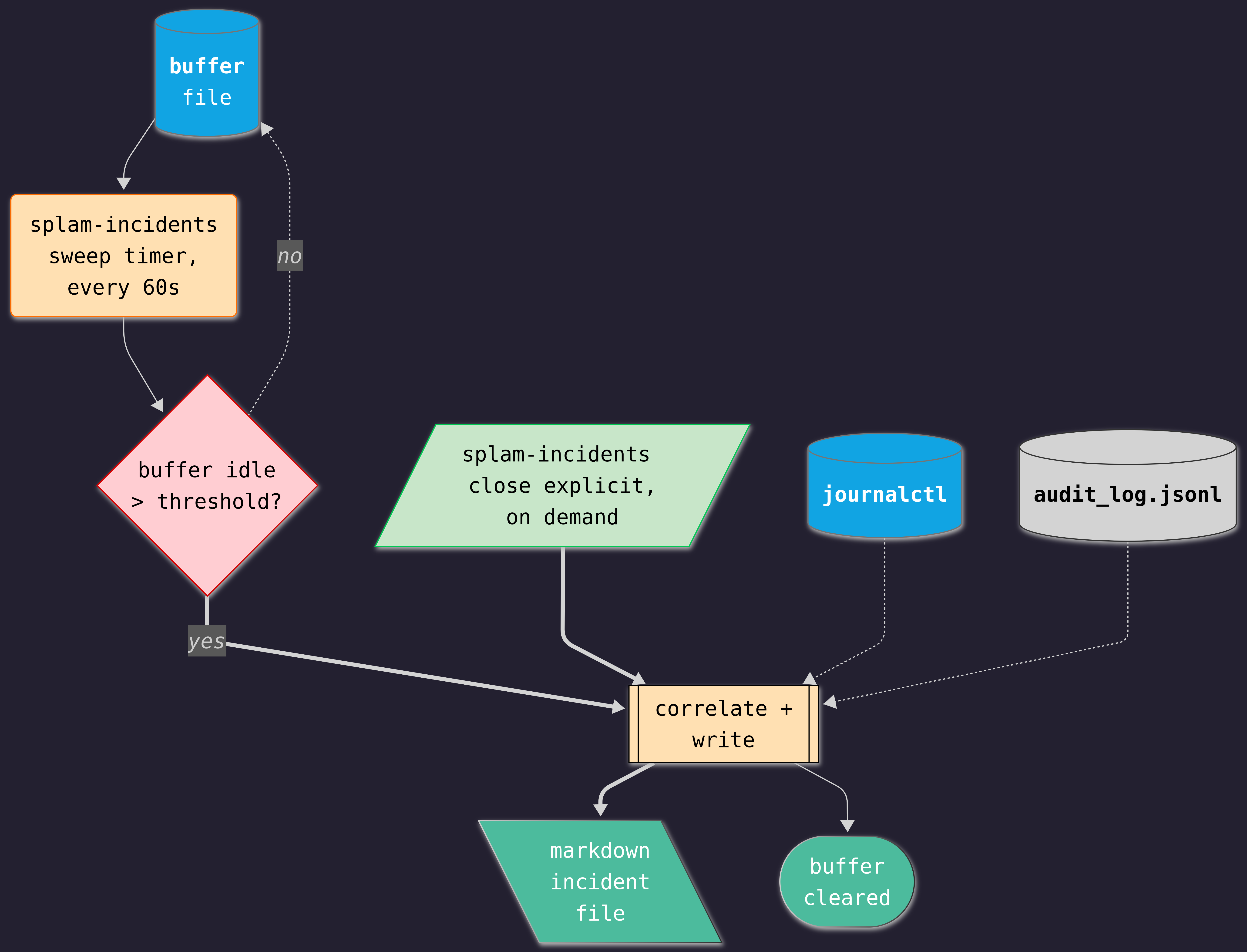
Either path lands in the same place: correlate the buffered commands against journalctl for the affected service and against splam’s own audit_log.jsonl in that window, write one markdown file (service, time range, commands run, the log lines immediately around them), and clear the buffer. Nothing here needs a database: manage_incidents.py’s _fetch_journal shells out to journalctl -u <service> --since --until for that window (skipped entirely when detect_service came back unknown), and _fetch_audit_entries filters audit_log.jsonl down to the same window by timestamp. splam-incidents sweep is a timer firing periodically, not a process that sits running.
The buffer is per-user, not per-service, so nothing hands correlate-and-write the service name directly. It scans the buffered commands for the last systemctl <verb> <unit>.service invocation and uses that, on the assumption that the command closest to the confirm step is the one that names what got fixed; a buffer with no systemctl call in it at all gets filed under unknown. That’s a heuristic, not a guarantee, and it’s wrong for a fix that never calls systemctl directly, e.g. a config edit someone else restarts later from a different session.
Setting it up
Three pieces: the audit rule, real-time dispatch (plugins.d on recent auditd, audispd on older systems), and a splam-incidents-sweep.timer running splam-incidents sweep every 60 seconds. See How-To: Shell Audit Setup for the actual commands and unit files; what follows here is why two details in that setup matter.
-F auid!=unset on the audit rule matters more than it looks. systemctl_action, get_status, and get_logs in app.py all shell out with no sudo prefix (splam has to already run with the privilege it needs), so every Status check, Logs fetch, and Actions-tab restart is also an execve at euid=0. Without this filter, splam’s own routine calls would match the rule too. Run splam as a proper systemd service (User=splam, no interactive login) and those calls carry no login session, so auid comes back unset and the rule excludes them at the source; only a real sudo session from an actual login gets tagged. This is one more reason to prefer the systemd-service deployment over running splam interactively from an admin’s own shell: do that instead, and the admin’s own clicks in the web UI inherit their real auid and end up mixed into their own SSH-session buffer along with their actual fixes.
shell_notify.py ships inside the splam package itself, next to redact.py, and the dispatch plugin’s path points straight at that installed file rather than a separate copy somewhere like /usr/local/libexec/. That’s not just convenience: load_redact() finds redact.py by looking next to itself on disk, so keeping the two files together, wherever pip happens to install them, is what makes that lookup work without either file needing to know the other’s absolute path in advance.
Redacting before anything is written
Deferring redaction to the correlate-and-write step, which an earlier draft of this page assumed, means the buffer sits on disk holding whatever ran, unredacted, for however long the window stays open. That’s backwards. The cheapest place to strip a secret is the same place the command is first seen: the notify script, on the way into .buffer/<user>.log, rather than later in the parser. One place for this to go wrong instead of two, and the buffer never holds anything the markdown file wouldn’t also be allowed to show.
The rules are a denylist of shapes, not a smart parser: a table of (name, regex) pairs, the same shape as _PATTERNS in highlight.py. A flag and the value that follows it (-p, --password, --token, --api-key, -u user:pass), an env-var-style assignment (\w*(SECRET|TOKEN|PASSWORD|KEY)\w*=\S+), credentials embedded in a URL (://user:pass@). Each match becomes [REDACTED] in place; nothing else in the line changes, so a redacted command is still readable as a command, just missing the part that shouldn’t be repeated.
The two ways this rule set can be wrong don’t cost the same. A false positive (redacting a UUID or a commit SHA that happened to look secret-shaped) makes one line less useful. A false negative leaves a real credential sitting in a file meant to be read casually. When a pattern is close, it should redact. That bias belongs in how the rules are written, not in a comment explaining it afterward.
Same code-and-override split as SERVICE_INFO and _PATTERNS: a default pattern set ships in code, and redaction_overrides.json in the data directory lets a deployment add its own (an internal token format, an in-house secret naming convention) without a code change. See Explanation: Config Overrides for why that split exists.
redact.py imports nothing beyond the standard library, on purpose: load_redact() loads it by file path rather than import, precisely so the notify script’s one redact() call per correlated command never pulls in the rest of splam (shiny, chatlas, everything the app needs to run). Importing the package normally would blow the tiny, synchronous budget from Capturing in real time before the regex ran.
A review gate for the ones that matter
No pattern list is exhaustive, and this one won’t be either: it catches known shapes, not a secret that doesn’t look like one. splam-incidents close <user> --review is the second layer, for an admin who already knows a fix touched something the patterns might miss: it writes to incidents/pending/ instead of incidents/, and the file only moves into the reviewed directory once someone confirms or edits it by hand. Nothing about this is required, which is the same tradeoff the explicit marker already makes (exact, but only if used), so it stays additive rather than something the whole feature depends on.
--review would also be the natural place for a full session transcript to earn a spot, on the same opt-in terms: an admin who already knows the redacted command list isn’t enough could ask for an asciinema recording of that one window. That’s not built. asciinema was ruled out as the general-purpose capture mechanism, not as a tool worth never touching, and --review is the boundary a narrower, opt-in use of it would have to stay inside if it’s ever added.
Where the records live
Same data directory as everything else splam already writes (paths.py: SPLAM_DATA_DIR, else XDG_DATA_HOME, else ~/.local/share/splam), in subdirectories so the incident files don’t mix with the JSON the app itself owns. SPLAM_INCIDENTS_DIR and SPLAM_BUFFER_DIR override the two locations individually, the same convention as SPLAM_AUDIT_LOG and SPLAM_HIGHLIGHT_OVERRIDES:
<data dir>/
├── credentials.json
├── audit_log.jsonl
├── service_info_overrides.json
├── highlight_overrides.json
├── redaction_overrides.json
├── incidents/
│   ├── 2026-08-15T1430-sshd.service.md
│   └── pending/
│       └── 2026-08-15T1512-nginx.service.md
└── .buffer/
    └── mfrigaard.log
.buffer/ holds one file per user with an open, not-yet-closed window; it never has more than one file per active user at a time, and each file is deleted the moment its incident is written. incidents/pending/ only exists once --review has been used at least once, same as the two existing overrides files only exist once Configure has been used.
Whether those files stay local operational data or get promoted somewhere durable (a runbook repo, a wiki) is the same open question Explanation: Config Overrides already raises about overrides: this app can write the file, but it can’t decide for an organization whether that file belongs in version control.
What this solves and doesn’t
It puts the fix step next to the diagnose and confirm steps that already have a trail, so the next admin who hits the same failure has the actual command instead of a description of one. It does not replace auditd as the system of record. The markdown file is a curated derivative of audit.log, not a substitute for it, and audit.log stays the thing an auditor asks for.
Redaction runs at capture time now, in the notify script, so .buffer/<user>.log and the markdown file never hold the raw form of anything the pattern list recognizes (see Redacting before anything is written). audit.log itself stays untouched; that’s auditd’s own record, already under separate access control, and redacting it isn’t this feature’s call to make. What’s left is narrower than “a raw secret in a casually-read file”: a secret shape the pattern list doesn’t recognize, slipping through into one. That’s what the --review gate is for: not a promise the pattern list is complete, an admission that it can’t be.
Testing this
What’s on this page splits cleanly into two kinds of thing to test, and they don’t belong in the same suite.
What’s unit-tested
redact(), is_idle, correlate_and_write, and the pure pieces of shell_notify.py are all tested without a live auditd, a real sudo session, or a timer:
tests/test_redact.py: table-driven, one case per pattern (-p secret123→-p [REDACTED],AWS_SECRET_ACCESS_KEY=xyz→AWS_SECRET_ACCESS_KEY=[REDACTED],https://user:pw@host→https://[REDACTED]@host) plus a set of things that survive untouched (--port 8080,systemctl restart nginx, a bare UUID), so the false-positive bias from Redacting before anything is written stays a test, not just a sentence on this page.tests/test_incidents.py:is_idleagainst an injected clock, nosleep()in sight;correlate_and_writeagainst a fixture buffer, fixturejournalctllines, and a fixtureaudit_log.jsonl, asserting the markdown file’s service, time range, and sections;detect_service,parse_buffer,buffer_path,list_buffered_users, andclear_buffereach get their own direct tests.tests/test_shell_notify.py:event_id,field, andparse_argvagainst realisticSYSCALL/EXECVEline fixtures;Correlator.feedfed those same lines in both orders, with a non-matchingkeyand with unrelated interleaved events, plus a clock-injected test for the 5-second prune;append_to_bufferagainst a temp directory;load_redactagainst the real, on-diskredact.py.
This is also where most of the coverage sits. It’s cheap to run, it’s where a subtle bug is likeliest (a regex that almost matches, an off-by-one on the idle window, a SYSCALL/EXECVE correlation edge case), and none of it needs anything CI doesn’t already have.
What needs a live system
The auditd rule, the plugins.d/audispd dispatch wiring, and shell_notify.py actually being invoked by a real privileged command aren’t things pytest can exercise without a rooted host running auditd, which most CI containers don’t have and shouldn’t need for this feature to ship. That path gets the smoke-test checklist in How-To: Shell Audit Setup instead of an automated suite: run a known sudo command, confirm the buffer has one redacted line; close the window and confirm the markdown file lands with the right content and the buffer is gone. Worth doing by hand once during setup and again after any change to the rule or the dispatch config.