# pkgs
library(vetiver)
library(pins)

# connect to model board
model_board <- pins::board_folder("../../../lab02/R/models/")

# read pinned vetiver model
v <- vetiver::vetiver_pin_read(model_board, "penguin_model")

# use plumber/vetiver to create router/create API
app <- plumber::pr() |> vetiver::vetiver_api(v)R App & API
I isolated development for the R Shiny app and API for lab 3 into separate app/ and api/ directories:
_labs/lab03/R
├── R.Rproj
├── api
│ ├── api.Rproj
│ └── mod-api.R
├── app
│ ├── app-api.R
│ └── app.Rproj
├── eda-db.qmd
└── r-data-load.R- 1
-
vetivermodel API
- 2
-
shinyapplication
- 3
-
EDA of
palmerpenguinsdata usingdplyrandggplot2
- 4
-
Load
palmerpenguinsdata intoduckdb
API
The _labs/lab03/R/api/mod-api.R file contains the following:
Start the API
The API will keep running when you run the app.
app |> plumber::pr_run(port = 8080, host = "127.0.0.1")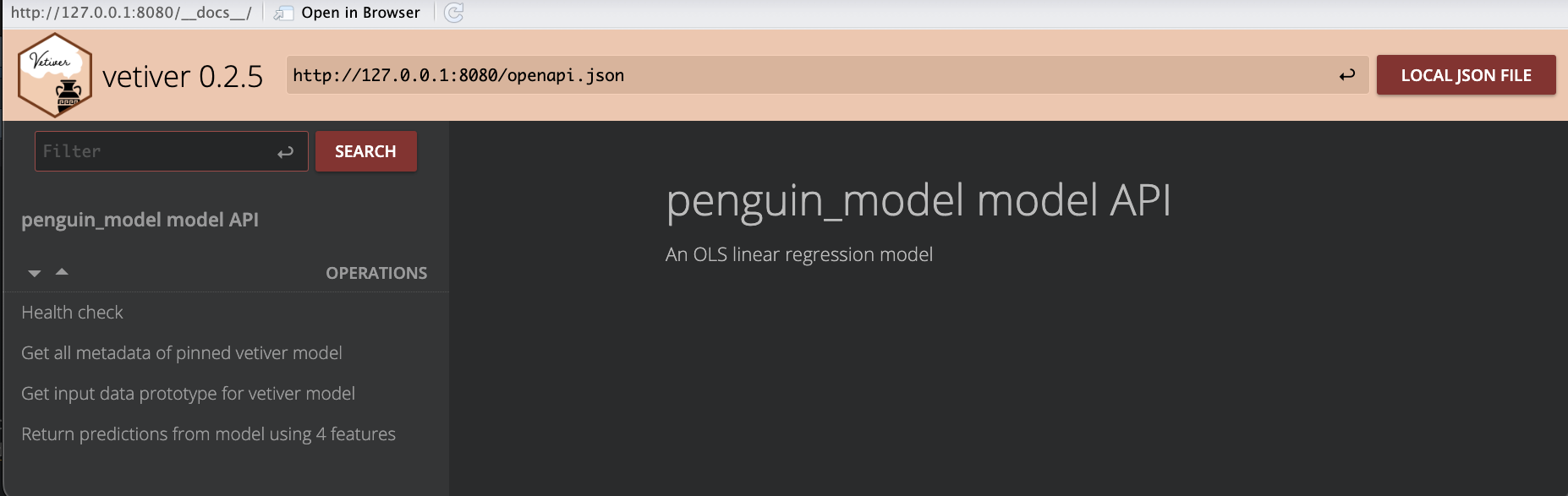
plumber API for vetiver modelNow we have a working API! We’ll explore the UI in the sections below. Let’s launch the app.1
App
I’ve made a few changes to the UI layout in app-api.R, so when I launched the app in a new RStudio session I see the following:
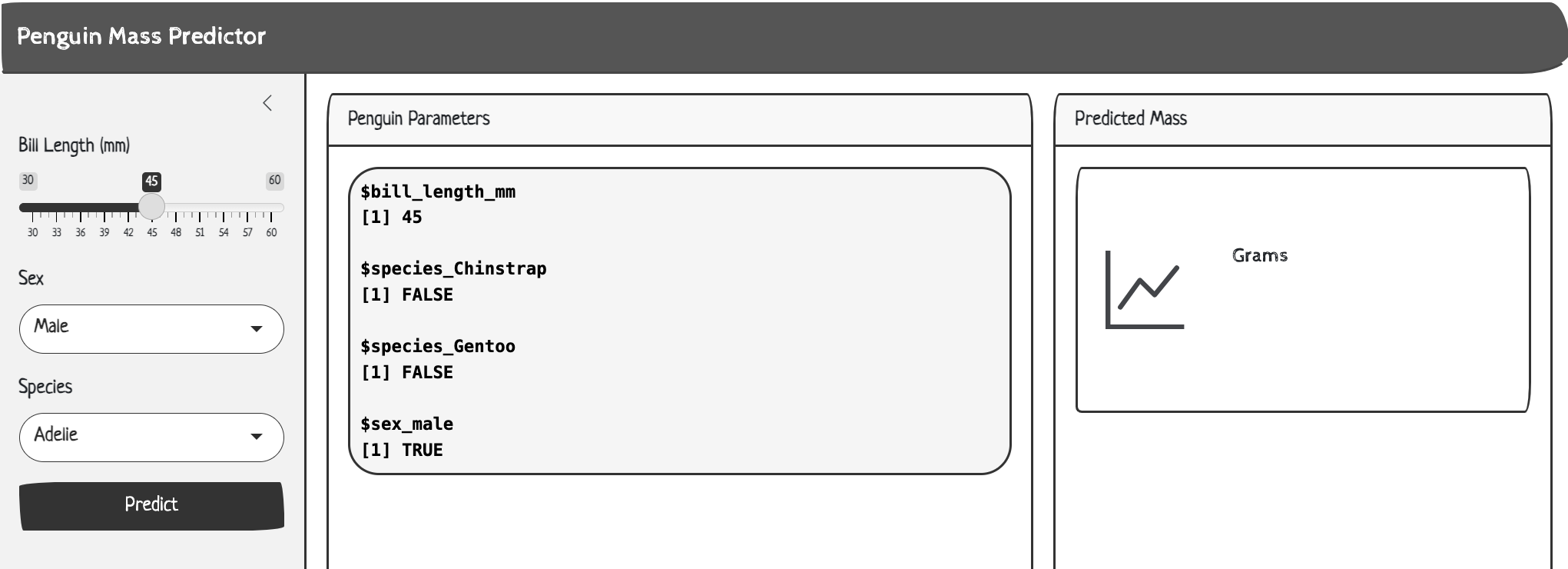
app-api.RView the UI changes below:
show/hide UI changes to app-api.R
api_url <- "http://127.0.0.1:8080/predict"

ui <- page_sidebar(
  title = "Penguin Mass Predictor",
  theme = bs_theme(bootswatch = "sketchy"),
  sidebar = sidebar(
    sliderInput(inputId = "bill_length",
      label = "Bill Length (mm)",
      min = 30,
      max = 60,
      value = 45,
      step = 1),
    selectInput(inputId = "sex",
      label = "Sex",
      choices = c("Male", "Female"),
      selected = "Male"),
    selectInput(
      inputId = "species",
      label = "Species",
      choices = c("Adelie", "Chinstrap", "Gentoo"),
      selected = "Adelie"),
    actionButton(
      inputId = "predict",
      label = "Predict",
      class = "btn-primary")
  ),

  layout_columns(
    card(
      card_header("Penguin Parameters"),
      card_body(
      verbatimTextOutput("vals")
      )
    ),
    card(
      card_header("Predicted Mass"),
      card_body(
        value_box(
          showcase_layout = "left center",
          title = "Grams",
          value = textOutput("pred"),
          showcase = bs_icon("graph-up"),
          max_height = "200px",
          min_height = "200px",
        )
      )
    ),
    col_widths = c(7, 5)
  )
)
But clicking Predict originally produced the following error:
Warning: Error in httr2::req_perform:
HTTP 500 Internal Server Error.
In the API session, we also see an error:
<error/rlang_error>
Error in `hardhat::validate_column_names()`:
! `data` must be a data frame or a matrix, not a list.
These errors are pretty clear: The httr2::req_body_json() function is sending the data as a JSON list, but the vetiver API expects a data frame or a matrix structure.
We can fix this in the application server by changing the format of the values sent to the API.
Reactive values
Our error tells us 'data' should be a data frame or a matrix, so we’ll convert vals() to a single-row data.frame and format the categorical values as numeric (not logical).
  vals <- reactive({
    data.frame(
      bill_length_mm = input$bill_length,
      species_Chinstrap = as.numeric(input$species == "Chinstrap"),
      species_Gentoo = as.numeric(input$species == "Gentoo"),
      sex_male = as.numeric(input$sex == "Male")
    )
  })
Predictions
The predictions in the server creates a response object and returns response$.pred[1] (i.e., only the predictions).
pred <- reactive({
tryCatch({
showNotification("Predicting penguin mass...",
type = "default", duration = 10)
request_data <- vals()
response <- httr2::request(api_url) |>
httr2::req_method("POST") |>
httr2::req_body_json(request_data, auto_unbox = FALSE) |>
httr2::req_perform() |>
httr2::resp_body_json()
showNotification("✅ Prediction successful!",
type = "default", duration = 10)
response$.pred[1]
}, error = function(e) {
error_msg <- conditionMessage(e)
if (grepl("Connection refused|couldn't connect", error_msg, ignore.case = TRUE)) {
user_msg <- "API not available - is the server running on port 8080?"
} else if (grepl("timeout|timed out", error_msg, ignore.case = TRUE)) {
user_msg <- "Request timed out - API may be overloaded"
} else {
user_msg <- paste("API Error:", substr(error_msg, 1, 50))
}
showNotification(paste("❌", user_msg), type = "warn", duration = 10)
paste("❌", user_msg)
})
}) |>
bindEvent(input$predict, ignoreInit = TRUE)- 1
-
app_urlis “http://127.0.0.1:8080/predict”
- 2
-
Converts
vals()/request_datainto a JSON array structure instead of a flat object (which is the formatvetiverexpects)
R API Request/Response Flow
The sections below cover the httr2 functions used in the Shiny API app.
The request()
httr2::request() creates the initial request (response) object that all other functions will modify:
Stores the base URL
Sets default HTTP method (
GET)Initializes empty headers, query parameters, and body
Returns a modifiable request object
# creates a base request with URL
response <- httr2::request(api_url)
%%{init: {'theme': 'base', 'themeVariables': {'fontFamily': 'monospace'}}}%%
graph TD
A("<strong>request()</strong> URL") --> B("Creates base<br>request object")
B --> C("Contains URL and<br>default settings")
style A fill:#5B8C5A,stroke:#000000,stroke-width:1px,color:#ffffff
style B fill:#D2562B,stroke:#000000,stroke-width:1px,color:#ffffff
style C fill:#485466,stroke:#000000,stroke-width:1px,color:#ffffff
req_method()
verb specification
httr2::req_method() specifies which HTTP method to use for the request.
GET: Retrieve data (no body allowed)POST: Send new data (body allowed)PUT: Update existing data (body allowed)DELETE: Remove data (usually no body)
%%{init: {'theme': 'base', 'themeVariables': {'fontFamily': 'monospace'}}}%%

graph TD
    A("Request Object") --> B("<strong>req_method()</strong>")
    B --> C("Sets HTTP verb")
    C --> D("GET/POST/PUT/DELETE/PATCH")
    style A fill:#5B8C5A,stroke:#000000,stroke-width:1px,color:#ffffff
    style B fill:#D2562B,stroke:#000000,stroke-width:1px,color:#ffffff
    style C fill:#D2562B,stroke:#000000,stroke-width:1px,color:#ffffff
    style D fill:#485466,stroke:#000000,stroke-width:1px,color:#ffffff
response <- httr2::request(api_url) |>
  httr2::req_method("POST") # sending data
req_body_json()
request body
httr2::req_body_json() converts R objects to JSON and includes them in the request body.
Converts R
lists/data.frames to JSON formatSets
Content-Type: application/jsonheader automaticallyIncludes the JSON in the HTTP request body
Used primarily with
POST/PUTrequests
%%{init: {'theme': 'base', 'themeVariables': {'fontFamily': 'monospace'}}}%%

graph TD
    A("R Object") --> B("<strong>req_body_json()</strong>")
    B --> C("Converts to JSON")
    C --> D("Adds to request body")
    style A fill:#5B8C5A,stroke:#000000,stroke-width:1px,color:#ffffff
    style B fill:#D2562B,stroke:#000000,stroke-width:1px,color:#ffffff
    style C fill:#D2562B,stroke:#000000,stroke-width:1px,color:#ffffff
    style D fill:#485466,stroke:#000000,stroke-width:1px,color:#ffffff
vals <- reactive({
  data.frame(
    bill_length_mm = input$bill_length,
    species_Chinstrap = as.numeric(input$species == "Chinstrap"),
    species_Gentoo = as.numeric(input$species == "Gentoo"),
    sex_male = as.numeric(input$sex == "Male")
  )
})

response <- httr2::request(api_url) |>
  httr2::req_method("POST") |> # sending data
  httr2::req_body_json(request_data, auto_unbox = FALSE)
req_perform()
execute request
httr2::req_perform() actually sends the HTTP request to the server and returns a response:
What happens:
1. Combines all request components (method, headers, query, body)
2. Opens network connection to server
3. Sends HTTP request
4. Waits for server response
5. Returns response object for processing
%%{init: {'theme': 'base', 'themeVariables': {'fontFamily': 'monospace'}}}%%

graph TD
    A("Complete Request<br>Object") --> B("<strong>req_perform()</strong>")
    B --> C("Sends HTTP request")
    C --> D("Returns response<br>object")
    style A fill:#5B8C5A,stroke:#000000,stroke-width:1px,color:#ffffff
    style B fill:#2A6F77,stroke:#000000,stroke-width:1px,color:#ffffff
    style C fill:#2A6F77,stroke:#000000,stroke-width:1px,color:#ffffff
    style D fill:#2A6F77,stroke:#000000,stroke-width:1px,color:#ffffff
response <- httr2::request(api_url) |>
  httr2::req_method("POST") |> # sending data
  httr2::req_body_json(request_data, auto_unbox = FALSE) |>
  httr2::req_perform()
resp_body_json()
JSON response parsing
httr2::resp_body_json() parses JSON response body into R objects.
Converts JSON arrays to R vectors/lists
Converts JSON objects to R named lists
Handles nested JSON structures
Automatically converts data types (numbers, booleans, strings)
%%{init: {'theme': 'base', 'themeVariables': {'fontFamily': 'monospace'}}}%%

graph TD
      A("JSON Response Body") --> B("<strong>resp_body_json()</strong>")
      B --> C("Parses JSON to R objects")
      C --> D("Lists, data.frames, etc.")
    style A fill:#D2562B,stroke:#000000,stroke-width:1px,color:#ffffff
    style B fill:#2A6F77,stroke:#000000,stroke-width:1px,color:#ffffff
    style C fill:#2A6F77,stroke:#000000,stroke-width:1px,color:#ffffff
    style D fill:#485466,stroke:#000000,stroke-width:1px,color:#ffffff
response <- httr2::request(api_url) |>
  httr2::req_method("POST") |> # sending data
  httr2::req_body_json(request_data, auto_unbox = FALSE) |>
  httr2::req_perform() |>
  httr2::resp_body_json()
Verify
Now when we launch the app, the preview of the parameters are in a data.frame (not a list):

data.frame()When we click Predict, we see notifications and the value is returned:
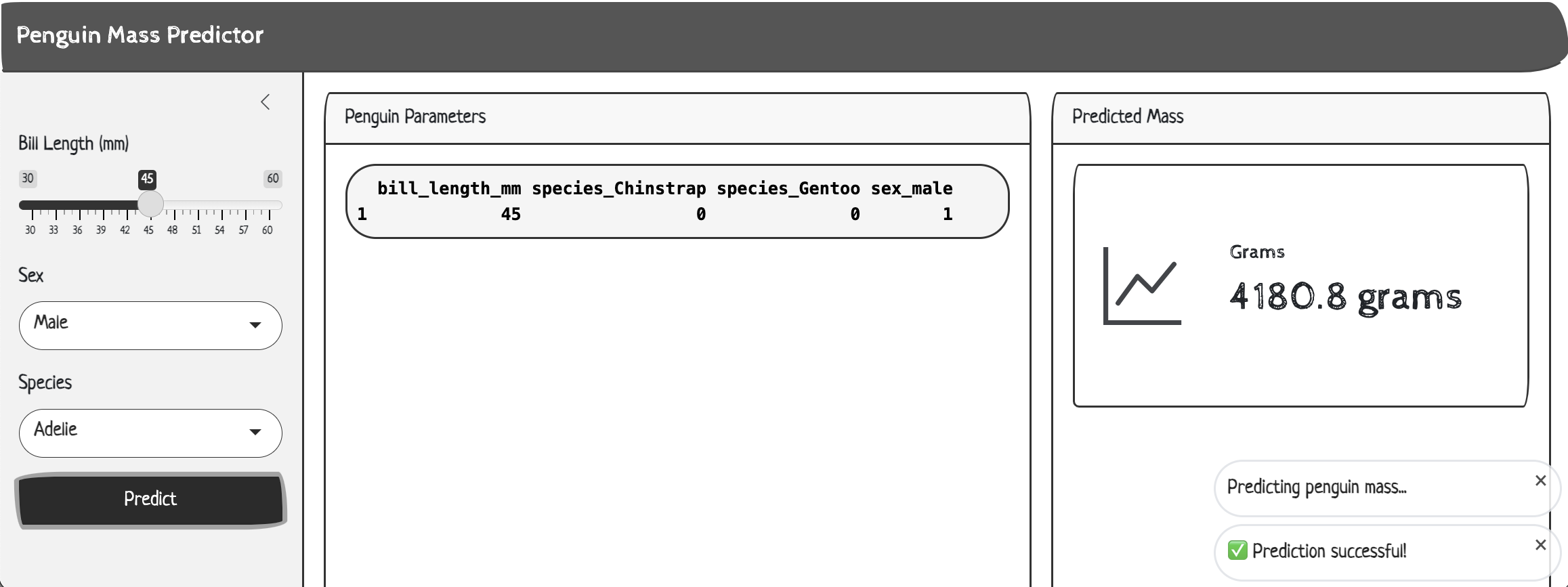
Back in the API
If we return to the plumber UI, we can click on Return predictions from model using 4 features, change the JSON values to match our parameters in the app, and click TRY:
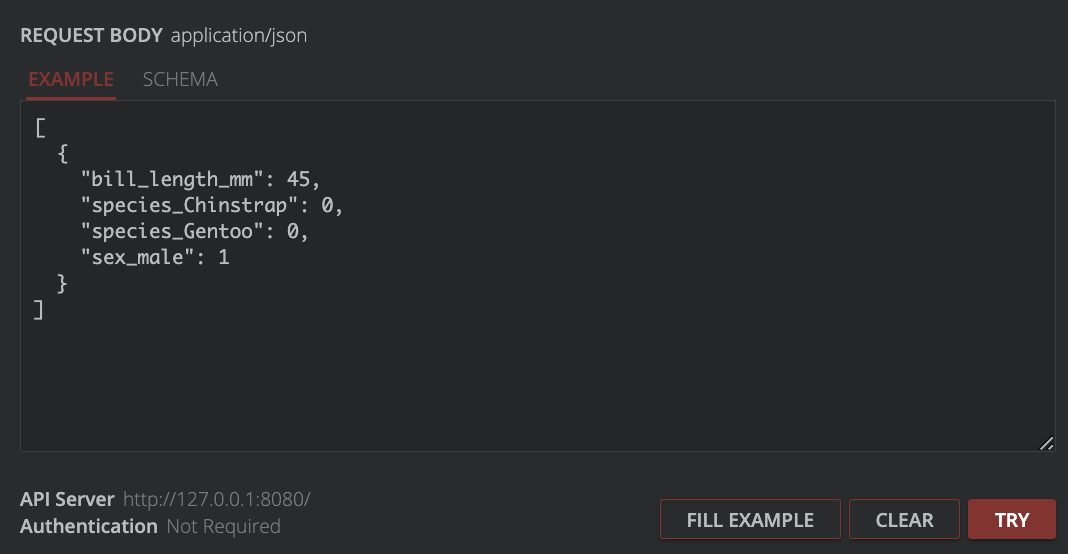
plumber API request bodyAnd we can compare the response to the value we saw in the app:
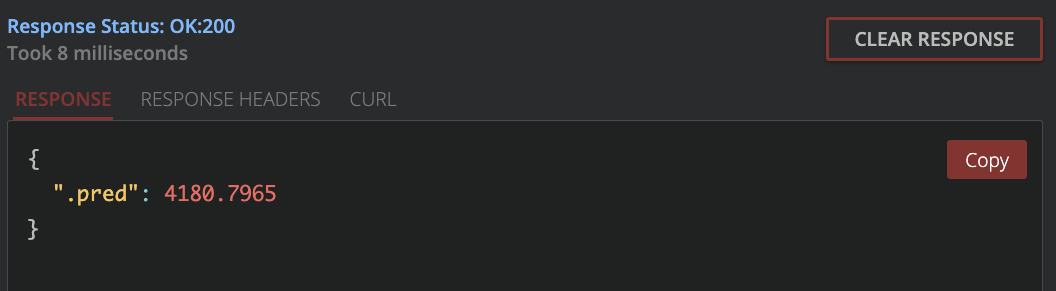
plumber API responseA diagram of the Shiny inputs sent(i.e., the Predict button), reactives, and the API request is below:
%%{init: {'theme': 'base', 'themeVariables': {'fontFamily': 'monospace'}}}%%

sequenceDiagram
    participant Customer as Shiny<br>App
    participant Waiter as Plumber<br>API
    participant Kitchen as Vetiver<br>Model

    Customer->>Waiter: Prediction request:<br>bill_length=45, species=Adelie,<br>and sex=male
    Waiter->>Kitchen: Prepare data
    Kitchen->>Waiter: Perform prediction
    Waiter->>Customer: Displays response:<br> 4180.8 grams
Finishing touches
To keep the R environment in each directory self-contained and reproducible, we should initiate a renv repo in each folder.
renv::init()This results in the following files:
R/api/ files
├── api.Rproj
├── mod-api.R
├── renv
│   ├── activate.R
│   ├── library
│   └── settings.json
└── renv.lock

3 directories, 5 files
R/app/ files
├── app-api.R
├── app.Rproj
├── renv
│   ├── activate.R
│   ├── library
│   └── settings.json
└── renv.lock

3 directories, 5 files
Original App Code
To view the original code in app-api.R, expand the section below:
Expand to view the original app-api.R
library(shiny)

api_url <- "http://127.0.0.1:8080/predict"

ui <- fluidPage(
  titlePanel("Penguin Mass Predictor"),

  # Model input values
  sidebarLayout(
    sidebarPanel(
      sliderInput(
        "bill_length",
        "Bill Length (mm)",
        min = 30,
        max = 60,
        value = 45,
        step = 0.1
      ),
      selectInput(
        "sex",
        "Sex",
        c("Male", "Female")
      ),
      selectInput(
        "species",
        "Species",
        c("Adelie", "Chinstrap", "Gentoo")
      ),
      # Get model predictions
      actionButton(
        "predict",
        "Predict"
      )
    ),

    mainPanel(
      h2("Penguin Parameters"),
      verbatimTextOutput("vals"),
      h2("Predicted Penguin Mass (g)"),
      textOutput("pred")
    )
  )
)

server <- function(input, output) {
  # Input params
  vals <- reactive(
    list(
      bill_length_mm = input$bill_length,
      species_Chinstrap = input$species == "Chinstrap",
      species_Gentoo = input$species == "Gentoo",
      sex_male = input$sex == "Male"
    )
  )

  # Fetch prediction from API
  pred <- eventReactive(
    input$predict,
    httr2::request(api_url) |>
      httr2::req_body_json(vals()) |>
      httr2::req_perform() |>
      httr2::resp_body_json(),
    ignoreInit = TRUE
  )

  # Render to UI
  output$pred <- renderText(pred()$predict[[1]])
  output$vals <- renderPrint(vals())
}

# Run the application
shinyApp(ui = ui, server = server)