%%{init: {'theme': 'base', 'themeVariables': {'fontFamily': 'monospace', "fontSize":"12px"}}}%%

graph TD
    subgraph Unit["Unit File"]
        DotService["<strong>/etc/systemd/system/*.service</strong>"]
    end
    Reload["<strong>systemctl daemon-reload</strong>"]
    Enable["<strong>systemctl enable</strong>"]
    Start["<strong>systemctl start</strong>"]
    Status["<strong>systemctl status</strong>"]

    Unit --> Reload --> Enable --"<em>starts on boot</em>"--> Start --"<em>running now</em>"--> Status

    style DotService stroke:#fff,stroke-width:1px,color:#000,font-family:monospace,font-size:11px
    style Unit fill:#1B2A41,stroke:#fff,stroke-width:1px,color:#fff
    style Reload fill:#2A6F77,stroke:#fff,stroke-width:1px,color:#fff,font-family:monospace,font-size:14px
    style Enable fill:#2A6F77,stroke:#fff,stroke-width:1px,color:#fff,font-family:monospace
    style Start fill:#5B8C5A,stroke:#fff,stroke-width:1px,color:#fff,font-family:monospace
    style Status fill:#E8A33D,stroke:#000,stroke-width:1px,color:#000,font-family:monospace
Lab 10: App Admin
Comprehension questions
“What are two different ways to install Linux applications, and what are the commands?”
My instance is Amazon Linux 2, so the system package manager is yum, not Ubuntu’s apt:
sudo yum install <package>pulls a package (and its dependencies) from AL2’s configured repositories.sudo yum updatekeeps everything already installed current.
For software that isn’t in the repos, I download the package myself with
wget <url>and install it directly:sudo yum localinstall <package>.rpm # or sudo rpm -i <package>.rpm- No dependency resolution beyond what’s already on the box, so this is my second choice, not my first.
“What does it mean to daemonize a Linux application? What programs and commands are used to do so?”
Daemonizing an application means running it as a background service that starts on boot, restarts if it crashes, and keeps running independent of any login session - instead of a process that dies the moment I close my SSH connection.
On AL2, systemd is the program that manages this, and systemctl is how I talk to it:
Once the unit file exists, systemctl restart and systemctl stop manage it going forward, and systemctl disable stops it from starting on boot.
A worked example: daemonizing a real app
baseball-trajectory, the app installed in Install Apps, is a good illustration of why daemonizing matters and what it actually looks like in a unit file. Started by hand from an SSH session, it dies the moment that session closes. Run as a service on an EC2 instance, systemd starts it on boot, restarts it after a crash, and collects its output, with something in front of it terminating TLS (covered in Configure SSL).
%%{init: {'theme': 'base', 'themeVariables': {'fontFamily': 'monospace', "fontSize":"12px"}}}%%

graph TD
    Op(["Operator<br/>browser"])
    Admin(["You<br/>SSH client"])

    subgraph EC2["EC2 Instance"]
        Nginx["<strong>nginx</strong><br/>:443 TLS"]
        App["<strong>baseball-trajectory</strong><br/>127.0.0.1:8000"]
        Sysd[("<strong>systemd</strong> + <strong>journald</strong>")]
    end
    MLB(["MLB Stats API<br/>statsapi.mlb.com"])

    Op --"HTTPS :443"--> Nginx
    Admin --"SSH :22"--> EC2
    Nginx --"HTTP :8000"--> App
    App --"<em>HTTPS :443</em>"--> MLB
    Sysd --"<em>supervises</em>"--> App

    style EC2 fill:#1B2A41,stroke:#fff,stroke-width:2px,color:#fff
    style Op fill:#d2562b,stroke:#fff,stroke-width:2px,color:#fff
    style Admin fill:#d2562b,stroke:#fff,stroke-width:2px,color:#fff
    style Nginx fill:#2a6f77,stroke:#fff,stroke-width:1px,color:#fff
    style App fill:#5b8c5a,stroke:#fff,stroke-width:2px,color:#fff
    style MLB fill:#666,stroke:#999,stroke-width:1px,color:#fff
    style Sysd fill:#e8a33d,stroke:#000,stroke-width:2px,color:#000
Notice the one outbound arrow. The app pulls rosters and career stats from the MLB Stats API on demand, so the instance’s security group and any NAT path have to allow outbound HTTPS, or the app starts cleanly and then fails on the first player lookup.
Create the unit file:
sudo vim /etc/systemd/system/baseball-trajectory.serviceAnd give it this content:
[Unit]
Description=baseball-trajectory
After=network.target

[Service]
Type=simple
User=baseball-trajectory
WorkingDirectory=/opt/baseball-trajectory
ExecStart=/opt/baseball-trajectory/.venv/bin/shiny run baseball_trajectory.app:app --host 127.0.0.1 --port 8000
Restart=on-failure
RestartSec=5

[Install]
WantedBy=multi-user.target
Four lines in there are doing the work worth understanding.
User=baseball-trajectory runs the process as the service account from Linux Users, not root. The app only serves requests and calls an external API, so that account needs no extra privilege at all.
ExecStart uses the absolute path into the venv. There’s no shell involved, no PATH to search, and no activation step. If this path is wrong the unit fails instantly, and it’s the single most common cause of a failed first start.
--host 127.0.0.1 binds the app to loopback only. Change it to 0.0.0.0 and the app is reachable from the internet without TLS and without the proxy, which is exactly what we don’t want.
Restart=on-failure with RestartSec=5 brings the app back after a crash, waiting five seconds between attempts so a fast crash loop doesn’t spin the CPU.
Load the new file and start the service:
sudo systemctl daemon-reload
sudo systemctl enable --now baseball-trajectory
daemon-reload tells systemd to reread the unit files on disk. enable registers the unit to start on boot, and --now starts it immediately so you don’t have to run start separately.
Confirming it actually came up
Never trust enable --now to mean the app is running. It means systemd tried.
sudo systemctl status baseball-trajectory● baseball-trajectory.service - baseball-trajectory
Loaded: loaded (/etc/systemd/system/baseball-trajectory.service; enabled; vendor preset: disabled)
Active: active (running) since Sat 2026-09-05 18:22:41 UTC; 12s ago
Main PID: 4812 (python3.12)
CGroup: /system.slice/baseball-trajectory.service
└─4812 /opt/baseball-trajectory/.venv/bin/python3.12 /opt/baseball-trajectory/.venv/bin/shiny run baseball_trajectory.app:app --host 127.0.0.1 --port 8000
Sep 05 18:22:41 ip-172-31-24-9 systemd[1]: Started baseball-trajectory.
Sep 05 18:22:42 ip-172-31-24-9 shiny[4812]: INFO: Started server process [4812]
Sep 05 18:22:42 ip-172-31-24-9 shiny[4812]: INFO: Uvicorn running on http://127.0.0.1:8000Two things to read here. Active: active (running) is the state, and enabled in the Loaded: line is the confirmation it will come back after a reboot. A unit can be running and not enabled, which works fine until the instance restarts.
Then confirm something is actually listening, from the instance itself:
curl -I http://127.0.0.1:8000HTTP/1.1 200 OK
date: Sat, 05 Sep 2026 18:23:10 GMT
server: uvicorn
content-type: text/html; charset=utf-8A 200 means the landing page rendered. A redirect is fine too. Connection refused means the process died between status and curl, and the journal will say why:
sudo journalctl -u baseball-trajectory -n 50 --no-pager-u filters to this unit, -n 50 limits it to the last 50 lines, and --no-pager dumps it straight to the terminal instead of opening less. When you want to watch a start attempt live, journalctl -u baseball-trajectory -f follows the log the same way tail -f does.
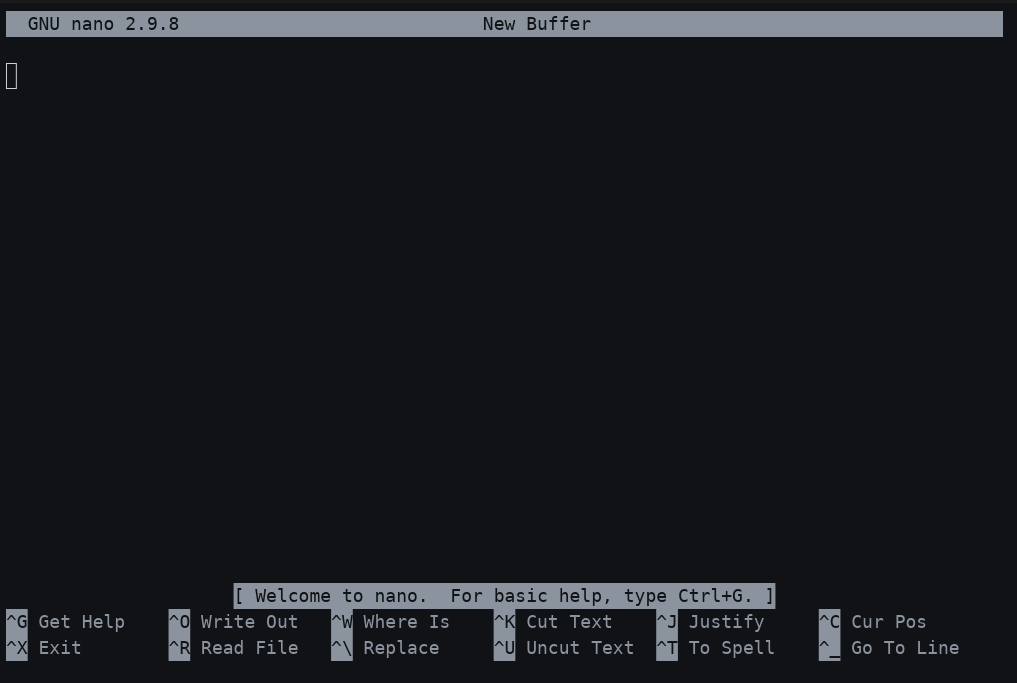
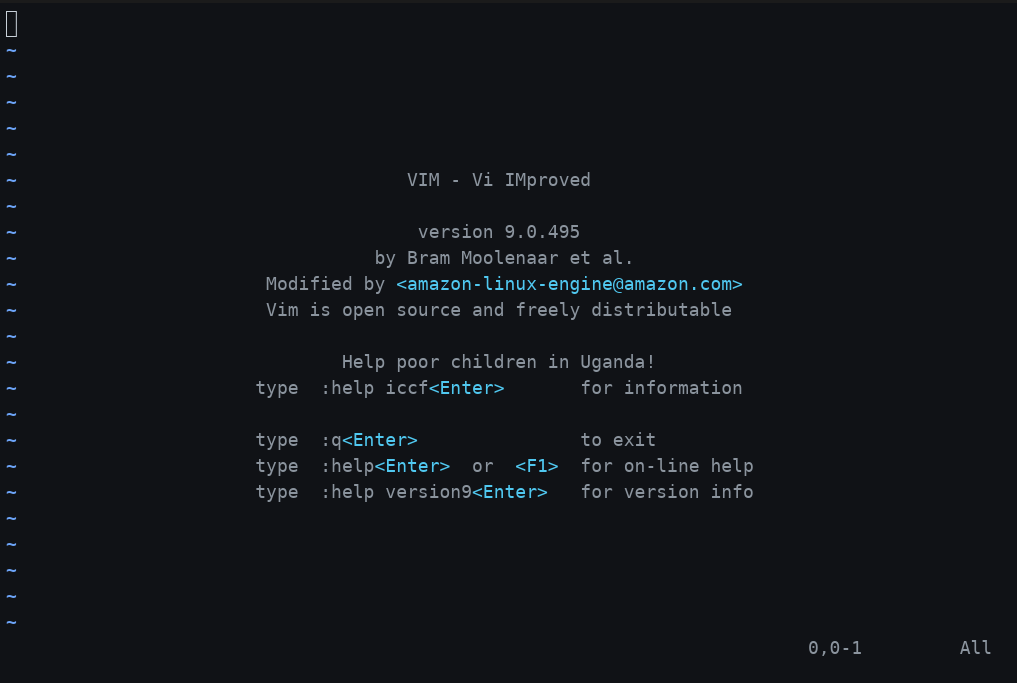
“How do you know if you’ve opened Nano or Vim? How would you exit them if you didn’t mean to?”
Nano tells me right away - the bottom of the screen fills with a menu of keybindings (^X Exit, ^O Write Out, etc.), and I can just start typing. Vim gives no such hints: it opens in normal mode, the screen is otherwise blank (empty lines marked with ~), and typing does nothing useful until I switch to insert mode. That silence is usually how I know I’ve landed in Vim by accident.
To back out without changing anything:
Nano: Ctrl + X, then answer N if it asks whether to save
Vim: press Esc first to make sure I’m in normal mode (not typing into the file), then type :q! and hit Enter to quit and discard any changes.
“What are four commands to read text files?”
cat, less, head, and tail. I reach for cat on short files, less for anything long enough to scroll, head when I only need the first lines, and tail -f when I want to watch a log file update in real time.
“How would you create a file called secrets.txt, open it with Vim, write something in, close and save it, and make it so that only you can read it?”
vim secrets.txtFrom there:
- Press
ito enter insert mode and type the content. - Press
Escto return to normal mode. - Type
:wqand hitEnterto write (save) and quit.
Then lock it down so only I can read it:
chmod 600 secrets.txt600 gives the owner read/write and removes every permission for group and other - same restriction I already use on .ssh/authorized_keys in Linux Users.