install.packages("plumber2")plumber2
This chapter covers building and consuming an R API using plumber2 (when do4ds was written, the original plumber package was used). We’ll build the same penguin body mass prediction API from lab 3 and connect it to a Shiny application, but update the API to use plumber2’s syntax.
APIs (refresher)
APIs (Application Programming Interfaces) are covered in lab 3. They work like placing an order in a restaurant:
%%{init: {'theme': 'base', 'themeVariables': {'fontFamily': 'monospace'}}}%%

sequenceDiagram
    participant Customer as Shiny App
    participant Waiter as API
    participant Kitchen as ML Model

    Customer->>Waiter: "I'd like a<br>prediction for<br>bill_length=45,<br>species=Adelie"
    Waiter->>Kitchen: Prepare data &<br>make prediction
    Kitchen->>Waiter: Prediction: 4180.8 grams
    Waiter->>Customer: Returns prediction
The process involves three steps:
- The Shiny app asks for predictions.
- The
plumber2API takes the values selected in the UI (as requests), and returns predictions (as responses). - ML Model does the actual work of calculating the predictions.
Overview
The updated plumber2 files are in the following folders:
api/
_labs/lab03/R/plumber2/api
├── api.Rproj
├── model.R
├── models/
│ └── penguin_model/
├── my-db.duckdb
├── plumber.R
├── README.md
├── renv/
└── renv.lock- 1
-
model.Rbuilds and stores the model used for predictions. - 2
-
plumber.Rbuilds and launches theplumber2API.
app/
_labs/lab03/R/plumber2/app
├── app-api.R
├── app.Rproj
├── renv/
└── renv.lock- 1
-
app-api.Ris the Shiny application that sends requests to the API.
The model (model.R)
The model.R file contains the packages and functions to build the linear model used to generate predictions from our Shiny app. Extend the code chunk below to review this process (but this code is identical to the original plumber api model.R file).
show/hide model.R
# pkgs
# these don't change
library(palmerpenguins)
library(duckdb)
library(DBI)
library(dplyr)
library(vetiver)
library(pins)
con <- DBI::dbConnect(duckdb::duckdb(), "my-db.duckdb")
duckdb::duckdb_register(con, "penguins_raw", palmerpenguins::penguins)
DBI::dbExecute(
con,
"CREATE OR REPLACE TABLE penguins AS SELECT * FROM penguins_raw"
)
df <- DBI::dbGetQuery(
con,
"SELECT bill_length_mm, species, sex, body_mass_g
FROM penguins
WHERE body_mass_g IS NOT NULL
AND bill_length_mm BETWEEN 30 AND 60
AND sex IS NOT NULL
AND species IS NOT NULL"
)
DBI::dbDisconnect(con)
model <- lm(body_mass_g ~ bill_length_mm + species + sex, data = df)
v <- vetiver::vetiver_model(
model,
model_name = "penguin_model",
description = "Linear model predicting penguin body mass from bill length, species, and sex",
save_prototype = TRUE
)
model_board <- pins::board_folder("./models")
vetiver::vetiver_pin_write(model_board, v)- 1
- Load packages.
- 2
-
Connect to
duckdb. - 3
-
Register the penguins
data.framewithduckdb. - 4
- Create a persistent table.
- 5
- Query and filter penguins data.
- 6
- Disconnect from database.
- 7
- Train the model using categorical variables directly (R handles dummy variable creation).
- 8
-
Create
vetivermodel. - 9
- Save the expected input format.
- 10
- Write model to board.
As illustrated in the figure below, model.R loads the duckdb data, trains the linear model, and stores the model/metadata in the models/penguin_model/ folder:
%%{init: {'theme': 'base', 'themeVariables': {'fontFamily': 'monospace'}}}%%

graph LR
    subgraph Training["<strong>Model Training</strong>"]
        ModelR("<strong>model.R</strong>")
        DuckDB("DuckDB <br> (as <strong>my-db.duckdb</strong>)")
        PinBoard("Pin Board<br><strong>models/penguin_model/</strong>")

        ModelR -->|"<em>loads data from</em>"| DuckDB
        ModelR -->|"<em>trains lm() model</em>"| LM("Linear Model")
        LM -->|"<em>wrapped by</em>"| Vetiver("Vetiver Model")
        Vetiver -->|"<em>saved to</em>"| PinBoard
    end
    style Training fill:#fbf7ec,stroke:#5B8C5A,color:#1B2A41
    style ModelR fill:#5B8C5A,stroke:#000000,stroke-width:1px,color:#ffffff
    style DuckDB fill:#5B8C5A,stroke:#000000,stroke-width:1px,color:#ffffff
    style LM fill:#D2562B,stroke:#000000,stroke-width:1px,color:#ffffff
    style Vetiver fill:#D2562B,stroke:#000000,stroke-width:1px,color:#ffffff
    style PinBoard fill:#2A6F77,stroke:#000000,stroke-width:1px,color:#ffffff
Our api/ folder contains the models/ directory (the duckdb database file is stored outside this folder):
├── models
│   └── penguin_model
│       └── 20251005T062750Z-74445
│           ├── data.txt
│           └── penguin_model.rds
└── my-db.duckdb
The prototype stored in the vetiver model contains the expected input format, including column names, data types, and factor levels:
v <- pins::board_folder("models/") |>
  vetiver::vetiver_pin_read("penguin_model")
We can see this when we examine it’s structure:
str(v$prototype)tibble [0 × 3] (S3: tbl_df/tbl/data.frame)
$ bill_length_mm: num(0)
$ species : Factor w/ 3 levels "Adelie","Chinstrap",..:
$ sex : Factor w/ 2 levels "female","male": The API (plumber.R)
The plumber.R file defines handler functions and assembles a plumber2 router, which is a complete rewrite and uses different function names and handler signatures. The most important change is in handler function signatures. In plumber, query parameters, body parameters, and path parameters are all mixed together as named function arguments, and the raw request body must be parsed manually.
In plumber2, these are separated:
- Path parameters are named arguments (e.g.,
/users/<id>→function(id))
- Query parameters are accessed via the
queryargument
- The request body is accessed via the
bodyargument (already parsed from JSON)
plumber vs plumber2
Below is a table comparing plumber to the new plumber2 syntax.
| Task | plumber |
plumber2 |
|---|---|---|
| Create router | pr() |
api() |
| Add GET route | pr_get() |
api_get() |
| Add POST route | pr_post() |
api_post() |
| Start server | pr_run() |
api_run() |
| JSON serializer | serializer_json() |
format_json() |
| Request body | jsonlite::fromJSON(req$postBody) |
body argument |
| Set response status | res$status <- 500 |
response$status <- 500L |
Load model
library(vetiver)
library(pins)
library(plumber2)
model_board <- pins::board_folder("models/")
v <- vetiver::vetiver_pin_read(model_board, "penguin_model")- 1
- Packages.
- 2
- Connect to model board.
- 3
-
Read pinned
vetivermodel.
Prepare prediction data
We’ll use the prep_pred_data() helper function again to bridge the gap by converting species and sex strings to factors (JSON doesn’t have factors, only strings) using the levels stored in the vetiver model prototype.
prep_pred_data <- function(input_data) {
  species_levels <- levels(v$prototype$species)
  sex_levels <- levels(v$prototype$sex)

  data.frame(
    bill_length_mm = as.numeric(input_data$bill_length_mm),
    species = factor(input_data$species, levels = species_levels),
    sex = factor(input_data$sex, levels = sex_levels),
    stringsAsFactors = FALSE
  )
}
The figure below illustrates the JSON -> data.frame() data conversion:
%%{init: {'theme': 'base', 'themeVariables': {'fontFamily': 'monospace'}}}%%

graph TB
    subgraph JSON["JSON from Shiny"]
        J1("species: 'Adelie'<br>(string)")
        J2("sex: 'male'<br>(string)")
    end

    subgraph Model["Model Expects"]
        M1("species: factor<br>(with levels)")
        M2("sex: factor<br>(with levels)")
    end

    subgraph Helper["Helper Function"]
        H("prep_pred_data()")
    end

    J1 & J2 --> Helper
    Helper --> M1 & M2


    style JSON fill:#fbf7ec,stroke:#5B8C5A,color:#1B2A41
    style Model fill:#fbf7ec,stroke:#2A6F77,color:#1B2A41
    style Helper fill:#fbf7ec,stroke:#D2562B,color:#1B2A41
    style J1 fill:#5B8C5A,stroke:#000000,stroke-width:1px,color:#ffffff
    style J2 fill:#5B8C5A,stroke:#000000,stroke-width:1px,color:#ffffff
    style H fill:#D2562B,stroke:#000000,stroke-width:1px,color:#ffffff
    style M1 fill:#2A6F77,stroke:#000000,stroke-width:1px,color:#ffffff
    style M2 fill:#2A6F77,stroke:#000000,stroke-width:1px,color:#ffffff
Handler functions
Each handler specializes in a different type of request. I’ve organized the handler functions into four categories: health, model info, documentation, and predictions. The same comment (#*) annotation comments define the HTTP method, path, and serializer for each handler when the file is loaded by plumber2.
Health
/ping
A minimal health check that returns a status and timestamp:
show/hide handle_ping()
#* Basic health check
#*
#* @get /ping
#* @serializer json
handle_ping <- function() {
  list(
    status = "alive",
    timestamp = Sys.time()
  )
}
Test with curl in the Terminal:1
curl http://127.0.0.1:8081/ping{
"status": ["alive"],
"timestamp": ["2025-10-08 08:31:51"]
}/health
An extended health check that includes model metadata and R version:
show/hide handle_health()
#* Detailed health check
#*
#* @get /health
#* @serializer json
handle_health <- function() {
  list(
    status = "healthy",
    timestamp = Sys.time(),
    model_name = v$model_name,
    model_version = v$metadata$version,
    r_version = R.version.string
  )
}
curl http://127.0.0.1:8081/health{
"status": ["healthy"],
"timestamp": ["2025-10-08 08:38:29"],
"model_name": ["penguin_model"],
"model_version": ["20251005T062750Z-74445"],
"r_version": ["R version 4.5.1 (2025-06-13)"]
}Model Info
/model-prototype
Returns the expected input format for all prediction requests:
show/hide handle_model_prototype()
#* Get model prototype information
#*
#* @get /model-prototype
#* @serializer json
handle_model_prototype <- function() {
  list(
    prototype = list(
      bill_length_mm = "numeric",
      species = list(
        type = "factor",
        levels = levels(v$prototype$species)
      ),
      sex = list(
        type = "factor",
        levels = levels(v$prototype$sex)
      )
    ),
    model_class = class(v$model)
  )
}
curl http://127.0.0.1:8081/model-prototypeshow/hide JSON response from model-prototype
{
  "prototype": {
    "bill_length_mm": ["numeric"],
    "species": {
      "type": ["factor"],
      "levels": ["Adelie", "Chinstrap", "Gentoo"]
    },
    "sex": {
      "type": ["factor"],
      "levels": ["female", "male"]
    }
  },
  "model_class": ["butchered_lm", "lm"]
}
/model-info
Returns comprehensive metadata about the deployed model:
show/hide handle_model_info()
#* Get model information and metadata
#*
#* @get /model-info
#* @serializer json
handle_model_info <- function() {
  list(
    model_name = v$model_name,
    model_class = class(v$model)[1],
    version = v$metadata$version,
    created = v$metadata$created,
    required_pkgs = v$metadata$required_pkgs,
    description = v$description %||% "No description available"
  )
}
show/hide JSON response from model-info
{
  "model_name": ["penguin_model"],
  "model_class": ["butchered_lm"],
  "version": ["20251005T062750Z-74445"],
  "created": {},
  "required_pkgs": {},
  "description": ["Linear model predicting penguin body mass from bill length, species, and sex"]
}
Documentation
/input-schema
Returns the field specifications and an example request:
show/hide handle_input_schema()
#* Get input schema and example
#*
#* @get /input-schema
#* @serializer json
handle_input_schema <- function() {
  list(
    required_fields = list(
      bill_length_mm = list(
        type = "numeric",
        description = "Bill length in millimeters",
        range = c(30, 60)
      ),
      species = list(
        type = "string (converted to factor)",
        description = "Penguin species",
        valid_values = levels(v$prototype$species)
      ),
      sex = list(
        type = "string (converted to factor)",
        description = "Penguin sex",
        valid_values = levels(v$prototype$sex)
      )
    ),
    example = list(
      bill_length_mm = 45.5,
      species = "Gentoo",
      sex = "male"
    )
  )
}
Predictions
/predict
The main prediction endpoint. In plumber2, the body argument replaces the req$postBody + jsonlite::fromJSON() pattern from plumber—plumber2 parses the JSON request body automatically.
show/hide handle_predict()
#* Predict penguin body mass
#*
#* @post /predict
#* @serializer json
handle_predict <- function(body, response) {
result <- tryCatch({
if (is.list(body) && !is.data.frame(body)) {
body <- as.data.frame(body)
}
pred_data <- prep_pred_data(body)
prediction <- predict(v, pred_data)
if (is.data.frame(prediction) && ".pred" %in% names(prediction)) {
list(.pred = prediction$.pred)
} else {
list(.pred = as.numeric(prediction))
}
}, error = function(e) {
response$status <- 500L
list(
error = conditionMessage(e),
timestamp = as.character(Sys.time())
)
})
return(result)
}- 1
-
bodyis parsed from JSON automatically byplumber2;responseis used to set status codes. - 2
- Handle both single prediction and batch.
- 3
- Convert strings to factors.
- 4
- Make prediction.
- 5
-
Handle different return types from
vetiver. - 6
-
Error handling —
response$status <- 500Lreplacesres$status <- 500fromplumber.
%%{init: {'theme': 'base', 'themeVariables': {'fontFamily': 'monospace'}}}%%

graph TB
    JSON("JSON Body: <br>'{'bill_length_mm':45,...}'")

    JSON -->|"<em>parsed by plumber2</em>"| Body("R List:<br>list(bill_length_mm=45,...)")

    Body -->|"<em>as.data.frame()</em>"| DF("Data Frame:<br>1 row × 3 columns")

    DF -->|"<em>prep_pred_data()</em>"| Factors("Proper Types:<br>numeric + factors")

    Factors -->|"<em>predict()</em>"| Result("Number:<br>4180.797")

    Result -->|"<em>list()</em>"| Response("{'.pred':[4180.797]}")
    style JSON fill:#5B8C5A,stroke:#000000,stroke-width:1px,color:#ffffff
    style Body fill:#D2562B,stroke:#000000,stroke-width:1px,color:#ffffff
    style DF fill:#D2562B,stroke:#000000,stroke-width:1px,color:#ffffff
    style Factors fill:#D2562B,stroke:#000000,stroke-width:1px,color:#ffffff
    style Result fill:#2A6F77,stroke:#000000,stroke-width:1px,color:#ffffff
    style Response fill:#2A6F77,stroke:#000000,stroke-width:1px,color:#ffffff
curl -X POST http://127.0.0.1:8081/predict \
  -H "Content-Type: application/json" \
  -d '{"bill_length_mm": 45, "species": "Adelie", "sex": "male"}'
{
".pred": [4180.7965]
}/predict-validated
Validates all inputs before making a prediction and returns descriptive error messages on failure:
show/hide handle_predict_validated()
#* Predict with input validation
#*
#* @post /predict-validated
#* @serializer json
handle_predict_validated <- function(body, response) {
result <- tryCatch({
required_fields <- c("bill_length_mm", "species", "sex")
missing_fields <- setdiff(required_fields, names(body))
if (length(missing_fields) > 0) {
response$status <- 400L
return(list(
error = "Missing required fields",
missing = missing_fields,
hint = "Required fields: bill_length_mm, species, sex"
))
}
valid_species <- levels(v$prototype$species)
if (!body$species %in% valid_species) {
response$status <- 400L
return(list(
error = "Invalid species",
provided = body$species,
valid_options = valid_species
))
}
valid_sex <- levels(v$prototype$sex)
if (!body$sex %in% valid_sex) {
response$status <- 400L
return(list(
error = "Invalid sex",
provided = body$sex,
valid_options = valid_sex
))
}
if (!is.numeric(body$bill_length_mm) ||
body$bill_length_mm < 30 ||
body$bill_length_mm > 60) {
response$status <- 400L
return(list(
error = "bill_length_mm must be numeric between 30 and 60",
provided = body$bill_length_mm,
valid_range = c(30, 60)
))
}
pred_data <- prep_pred_data(body)
prediction <- predict(v, pred_data)
list(
prediction = as.numeric(prediction),
input = body,
model_version = v$metadata$version,
timestamp = Sys.time()
)
}, error = function(e) {
response$status <- 500L
list(
error = conditionMessage(e),
timestamp = as.character(Sys.time())
)
})
return(result)
}- 1
- Check for required fields.
- 2
- Return 400 if fields are missing.
- 3
- Validate species value.
- 4
- Validate sex value.
- 5
- Validate bill length range.
- 6
- Prepare data and predict.
- 7
- Return prediction with metadata.
%%{init: {'theme': 'base', 'themeVariables': {'fontFamily': 'monospace'}}}%%

graph TD
    Start("Request<br>Received")

    Start --> Check1{All fields<br>present?}
    Check1 -->|No| Error1("400: Missing fields")
    Check1 -->|Yes| Check2{Species<br>valid?}

    Check2 -->|No| Error2("400: Invalid species")
    Check2 -->|Yes| Check3{Sex<br>valid?}

    Check3 -->|No| Error3("400: Invalid sex")
    Check3 -->|Yes| Check4{Bill length<br>30-60mm?}

    Check4 -->|No| Error4("400: Out of range")
    Check4 -->|Yes| Predict("Make Prediction")

    Predict --> Success("Return prediction<br>with metadata")
    style Start fill:#5B8C5A,stroke:#000000,stroke-width:1px,color:#ffffff
    style Check1 fill:#485466,stroke:#000000,stroke-width:1px,color:#ffffff
    style Check2 fill:#485466,stroke:#000000,stroke-width:1px,color:#ffffff
    style Check3 fill:#485466,stroke:#000000,stroke-width:1px,color:#ffffff
    style Check4 fill:#485466,stroke:#000000,stroke-width:1px,color:#ffffff
    style Error1 fill:#D2562B,stroke:#000000,stroke-width:1px,color:#ffffff
    style Error2 fill:#D2562B,stroke:#000000,stroke-width:1px,color:#ffffff
    style Error3 fill:#D2562B,stroke:#000000,stroke-width:1px,color:#ffffff
    style Error4 fill:#D2562B,stroke:#000000,stroke-width:1px,color:#ffffff
    style Predict fill:#5B8C5A,stroke:#000000,stroke-width:1px,color:#ffffff
    style Success fill:#2A6F77,stroke:#000000,stroke-width:1px,color:#ffffff
An invalid species value returns a 400 error with the valid options:
curl -X POST http://127.0.0.1:8081/predict-validated \
   -H "Content-Type: application/json" \
   -d '{"bill_length_mm": 45, "species": "Emperor", "sex": "male"}'
{
"error": ["Invalid species"],
"provided": ["Emperor"],
"valid_options": ["Adelie", "Chinstrap", "Gentoo"]
}/predict-batch
Accepts arrays of values to return multiple predictions in a single request:
show/hide handle_predict_batch()
#* Batch predictions
#*
#* @post /predict-batch
#* @serializer json
handle_predict_batch <- function(body, response) {
result <- tryCatch({
if (!is.data.frame(body)) {
body <- as.data.frame(body)
}
pred_data <- prep_pred_data(body)
predictions <- predict(v, pred_data)
list(
predictions = as.numeric(predictions),
count = nrow(pred_data),
timestamp = Sys.time()
)
}, error = function(e) {
response$status <- 500L
list(
error = conditionMessage(e),
timestamp = as.character(Sys.time())
)
})
return(result)
}- 1
-
Ensure we have a
data.frame. - 2
- Prepare data.
- 3
- Make predictions.
- 4
- Return predictions, count, and timestamp.
curl -X POST http://127.0.0.1:8081/predict-batch \
   -H "Content-Type: application/json" \
   -d '{
     "bill_length_mm": [45, 39, 50],
     "species": ["Adelie", "Adelie", "Gentoo"],
     "sex": ["male", "female", "male"]
   }'
{
"predictions": [4180.7965, 3438.2083, 5438.3484],
"count": [3],
"timestamp": ["2025-10-08 13:45:41"]
}The Router
The last section of plumber.R assembles a router by chaining handler registrations with api(). In plumber2, api() replaces pr() and the api_get()/api_post() functions replace pr_get()/pr_post().
Each api_get() or api_post() call maps a URL path and HTTP method to a handler function. The serializer argument controls how the return value is converted for the response.
GET Endpoints
show/hide GET endpoints
app <- plumber2::api() |>
api_get(
path = "/ping",
handler = handle_ping,
serializer = format_json()
) |>
api_get(
path = "/health",
handler = handle_health,
serializer = format_json()
) |>
api_get(
path = "/model-prototype",
handler = handle_model_prototype,
serializer = format_json()
) |>
api_get(
path = "/model-info",
handler = handle_model_info,
serializer = format_json()
) |>
api_get(
path = "/input-schema",
handler = handle_input_schema,
serializer = format_json()
)- 1
-
api_get()replacespr_get();format_json()replacesserializer_json(). - 2
-
Each
api_get()call adds oneGETroute to the router’s dispatch table.
Route table after GET registrations:
| Path | Method | Handler | Purpose |
|---|---|---|---|
/ping |
GET | handle_ping() |
Quick health check |
/health |
GET | handle_health() |
Detailed status |
/model-prototype |
GET | handle_model_prototype() |
Input format |
/model-info |
GET | handle_model_info() |
Model metadata |
/input-schema |
GET | handle_input_schema() |
Field documentation |
POST Endpoints
show/hide POST endpoints
  api_post(
    path = "/predict",
    handler = handle_predict,
    serializer = format_json()
  ) |>
  api_post(
    path = "/predict-validated",
    handler = handle_predict_validated,
    serializer = format_json()
  ) |>
  api_post(
    path = "/predict-batch",
    handler = handle_predict_batch,
    serializer = format_json()
  )
Updated route table:
| Path | Method | Handler | Purpose |
|---|---|---|---|
/predict |
POST | handle_predict() |
Basic prediction |
/predict-validated |
POST | handle_predict_validated() |
Prediction with validation |
/predict-batch |
POST | handle_predict_batch() |
Multiple predictions |
The Server
api_run() replaces pr_run() to start the server:
app |> plumber2::api_run(port = 8081, host = "127.0.0.1")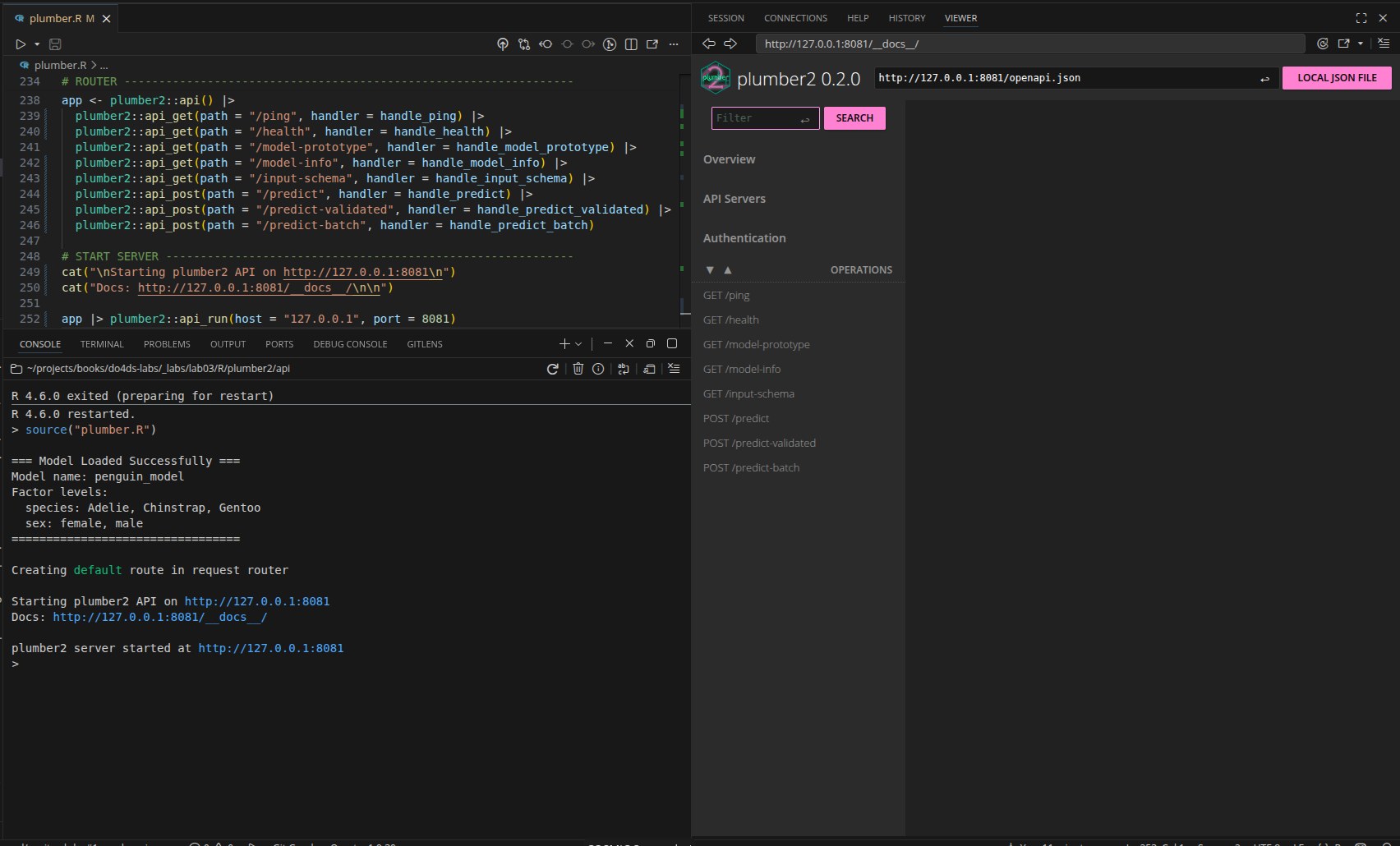
plumber2 UIIf we click on the API Servers, we will see the url our plumber2 api is running on:
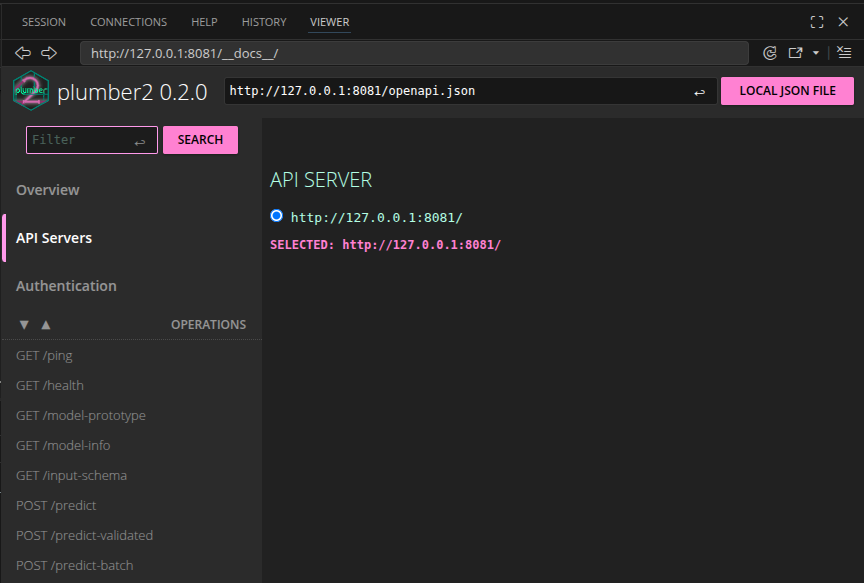
plumber2 API serverWith the API running, we can connect to it from a Shiny application.
The Shiny App (app-api.R)
The app-api.R file is a Shiny application that sends user input to the API and displays the prediction. It lives in the separate app/ directory.
The API URL is defined at the top of the file:
api_url <- "http://127.0.0.1:8081/predict"UI
show/hide UI
ui <- page_sidebar(
  title = "Penguin Mass Predictor",
  theme = bs_theme(bootswatch = "sketchy"),
  sidebar = sidebar(
    sliderInput(
      inputId = "bill_length",
      label = "Bill Length (mm)",
      min = 30, max = 60, value = 45, step = 1
    ),
    selectInput(
      inputId = "sex",
      label = "Sex",
      choices = c("male", "female"),
      selected = "male"
    ),
    selectInput(
      inputId = "species",
      label = "Species",
      choices = c("Adelie", "Chinstrap", "Gentoo"),
      selected = "Adelie"
    ),
    actionButton(
      inputId = "predict",
      label = "Predict",
      class = "btn-primary"
    )
  ),
  layout_columns(
    card(
      card_header("Penguin Parameters"),
      card_body(verbatimTextOutput("vals"))
    ),
    card(
      card_header("Predicted Mass"),
      card_body(
        value_box(
          showcase_layout = "left center",
          title = "Grams",
          value = textOutput("pred"),
          showcase = bs_icon("graph-up"),
          max_height = "200px",
          min_height = "200px"
        )
      )
    ),
    col_widths = c(7, 5)
  )
)
Reactive values
Because the plumber2 API’s /predict endpoint accepts species and sex as strings (not dummy variables), vals() can pass them directly—no numeric encoding required:
vals <- reactive({
data.frame(
bill_length_mm = input$bill_length,
species = input$species,
sex = input$sex
)
})- 1
-
Species and sex are sent as strings (
"Adelie","male");prep_pred_data()in the API converts them to factors.
This is simpler than the original approach, which required manual dummy variable creation (species_Chinstrap = as.numeric(input$species == "Chinstrap"), etc.).
Predictions
The pred reactive sends vals() to the API and extracts the prediction from the response:
show/hide pred reactive
pred <- reactive({
tryCatch({
showNotification("Predicting penguin mass...", type = "default", duration = 10)
response <- httr2::request(api_url) |>
httr2::req_method("POST") |>
httr2::req_body_json(vals()) |>
httr2::req_perform() |>
httr2::resp_body_json()
showNotification("Prediction successful!", type = "default", duration = 10)
response$.pred[[1]]
}, error = function(e) {
error_msg <- conditionMessage(e)
if (grepl("Connection refused|couldn't connect", error_msg, ignore.case = TRUE)) {
user_msg <- "API not available - is the server running on port 8081?"
} else if (grepl("timeout|timed out", error_msg, ignore.case = TRUE)) {
user_msg <- "Request timed out - API may be overloaded"
} else {
user_msg <- paste("API Error:", substr(error_msg, 1, 50))
}
showNotification(paste("Error:", user_msg), type = "warn", duration = 10)
paste("Error:", user_msg)
})
}) |>
bindEvent(input$predict, ignoreInit = TRUE)- 1
-
request()creates the base request object with the API URL. - 2
-
req_method("POST")sets the HTTP verb. - 3
-
req_body_json()serializesvals()as JSON and setsContent-Type: application/json. - 4
-
req_perform()sends the request and returns a response object. - 5
-
resp_body_json()parses the JSON response body into an R list.
httr2 request/response pipeline
The five httr2 functions work as a pipeline, each building on the previous step:
%%{init: {'theme': 'base', 'themeVariables': {'fontFamily': 'monospace'}}}%%

graph TD
    ReqObj("request(url)") -->|"sets URL"| MethObj
    MethObj("req_method('POST')") -->|"sets verb"| BodyObj
    BodyObj("req_body_json(data)") -->|"attaches body"| PerfObj
    PerfObj("req_perform()") -->|"sends request"| RespObj
    RespObj("resp_body_json()") -->|"parses response"| Result("R list")
    style ReqObj fill:#5B8C5A,stroke:#000000,stroke-width:1px,color:#ffffff
    style MethObj fill:#D2562B,stroke:#000000,stroke-width:1px,color:#ffffff
    style BodyObj fill:#D2562B,stroke:#000000,stroke-width:1px,color:#ffffff
    style PerfObj fill:#D2562B,stroke:#000000,stroke-width:1px,color:#ffffff
    style RespObj fill:#D2562B,stroke:#000000,stroke-width:1px,color:#ffffff
    style Result fill:#2A6F77,stroke:#000000,stroke-width:1px,color:#ffffff
| Function | Role |
|---|---|
request(url) |
Creates a base request with the target URL |
req_method("POST") |
Sets the HTTP verb (GET, POST, PUT, DELETE) |
req_body_json(data) |
Converts data to JSON and sets it as the request body |
req_perform() |
Sends the assembled request; returns a response object |
resp_body_json() |
Parses the JSON response body into an R list |
Outputs
The server renders vals() and pred() to the UI:
output$vals <- renderPrint(vals())
output$pred <- renderText({
  p <- pred()
  if (is.numeric(p)) round(p, 1) else p
})
Full server
show/hide full server
server <- function(input, output, session) {

  vals <- reactive({
    data.frame(
      bill_length_mm = input$bill_length,
      species = input$species,
      sex = input$sex
    )
  })

  pred <- reactive({
    tryCatch({
      showNotification("Predicting penguin mass...", type = "default", duration = 10)

      response <- httr2::request(api_url) |>
        httr2::req_method("POST") |>
        httr2::req_body_json(vals()) |>
        httr2::req_perform() |>
        httr2::resp_body_json()

      showNotification("Prediction successful!", type = "default", duration = 10)

      response$.pred[[1]]

    }, error = function(e) {
      error_msg <- conditionMessage(e)

      if (grepl("Connection refused|couldn't connect", error_msg, ignore.case = TRUE)) {
        user_msg <- "API not available - is the server running on port 8081?"
      } else if (grepl("timeout|timed out", error_msg, ignore.case = TRUE)) {
        user_msg <- "Request timed out - API may be overloaded"
      } else {
        user_msg <- paste("API Error:", substr(error_msg, 1, 50))
      }

      showNotification(paste("Error:", user_msg), type = "warn", duration = 10)
      paste("Error:", user_msg)
    })
  }) |>
    bindEvent(input$predict, ignoreInit = TRUE)

  output$vals <- renderPrint(vals())
  output$pred <- renderText({
    p <- pred()
    if (is.numeric(p)) round(p, 1) else p
  })
}

shinyApp(ui = ui, server = server)
Verify
When we click on the Predict button, we see our predicted value from the API:
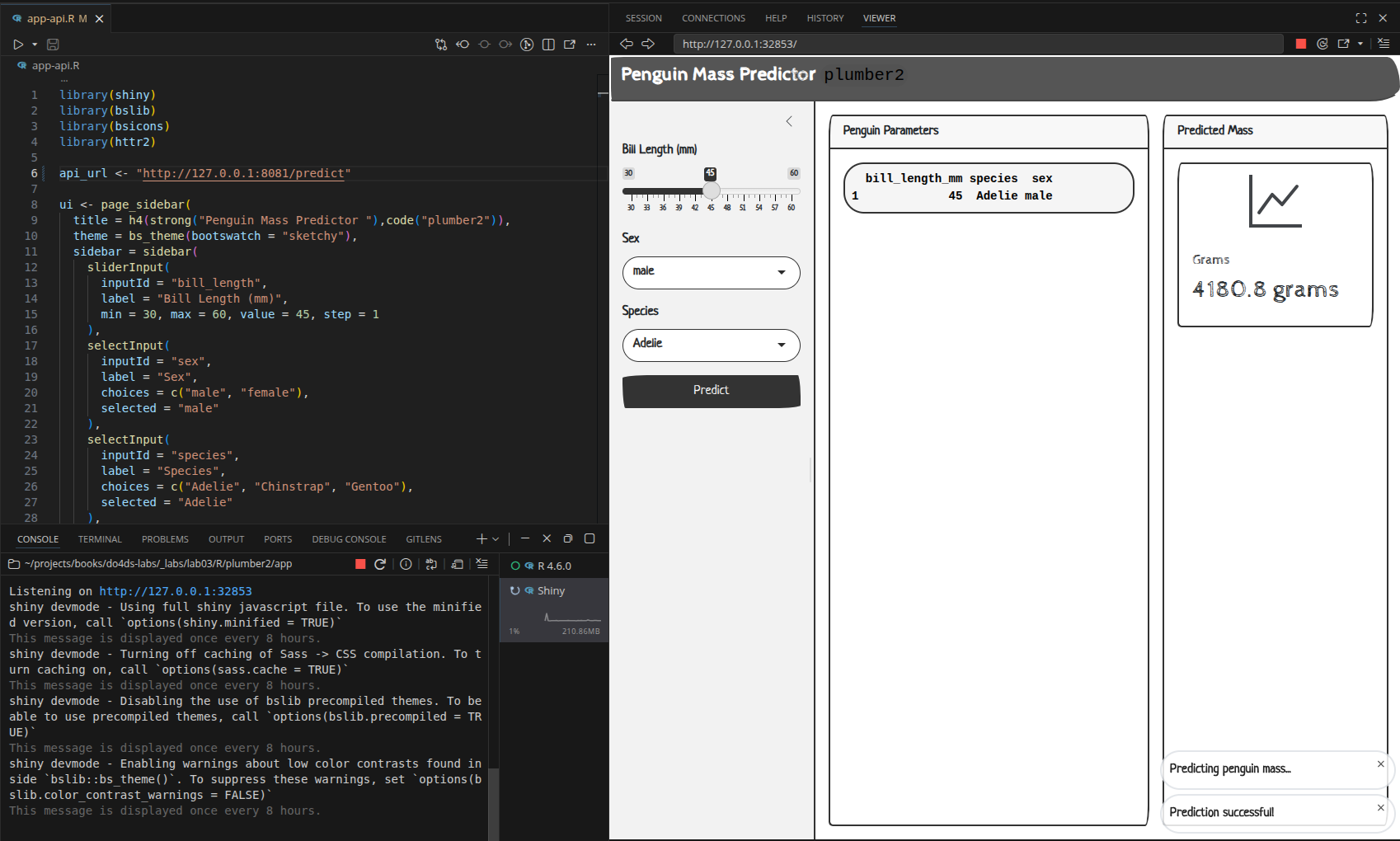
The full request/response flow from button click to displayed prediction:
%%{init: {'theme': 'base', 'themeVariables': {'fontFamily': 'monospace'}}}%%

sequenceDiagram
    participant Shiny as Shiny App
    participant Handler as handle_predict()
    participant Helper as prep_pred_data()
    participant Model as Linear Model

    Shiny->>Handler: POST /predict<br>{"bill_length_mm": 45,<br>"species": "Adelie",<br>"sex": "male"}

    Note over Handler: 1) body parsed<br>by plumber2
    Note over Handler: 2) Convert to<br>data.frame
    Handler->>Helper: prep_pred_data()
    Helper-->>Handler: data.frame with factors

    Note over Handler: 3) Predict
    Handler->>Model: predict(v, data)
    Note over Model: y = β₀ +<br>β₁×bill_length +<br>β₂×species +<br>β₃×sex
    Model-->>Handler: 4180.797

    Note over Handler: 4) Format<br>response
    Handler-->>Shiny: {".pred": [4180.797]}
To keep environments self-contained and reproducible, initialize renv in each directory:
renv::init()We’ll cover how to keep detailed logs on APIs and Apps in R App Logging.
We’re using port
8081for ourplumber2API (8080is being used by theplumberAPI).↩︎