%%{init: {'theme': 'base', 'themeVariables': {'fontFamily': 'monospace'}}}%%

graph TD
    Push(["<strong>Developer</strong><br/><em>Pushes to branch</em>"])
    GHA{{"<strong>GitHub Actions</strong>"}}
    Push --Triggers--> GHA
    GHA --"Build Models"--> Build("<strong>Vetiver Models</strong><br/><em>(py_model.qmd, <br>r_model.qmd)</em>")
    Build --> Auth("<strong>Configure</strong><br><em>AWS Credentials</em>")
    Auth --"Upload to"--> S3("<strong>S3</strong><br/><em>(using pins)</em>")
    S3 --> Success(["Models<br/>Published"])

    style Push fill:#5B8C5A,stroke:#000000,stroke-width:1px,color:#ffffff
    style GHA fill:#E8A33D,stroke:#000000,stroke-width:1px,color:#ffffff
    style Build fill:#1B2A41,stroke:#000000,stroke-width:1px,color:#ffffff
    style Auth fill:#2A6F77,stroke:#000000,stroke-width:1px,color:#ffffff
    style S3 fill:#D2562B,stroke:#000000,stroke-width:1px,color:#ffffff
    style Success fill:#5B8C5A,stroke:#000000,stroke-width:1px,color:#ffffff
GitHub Actions and S3
GitHub Actions can automatically build and publish our vetiver models to our S3 whenever we push changes to a specific branch (we covered these in Lab 5 and GitHub Actions as CI/CD). I’ve stored the Quarto files for building, pushing, and pulling the model data in the _labs/lab07/ folder.
In this section I’ll cover setting up AWS credentials as repository secrets and creating a workflow to automate the model publishing process.
Automating Model Deployment with GitHub Actions
We need to add AWS configuration to the GitHub repository (Settings > Secrets and variables > Actions). Sensitive credentials go in Secrets, while non-sensitive configuration goes in Variables:
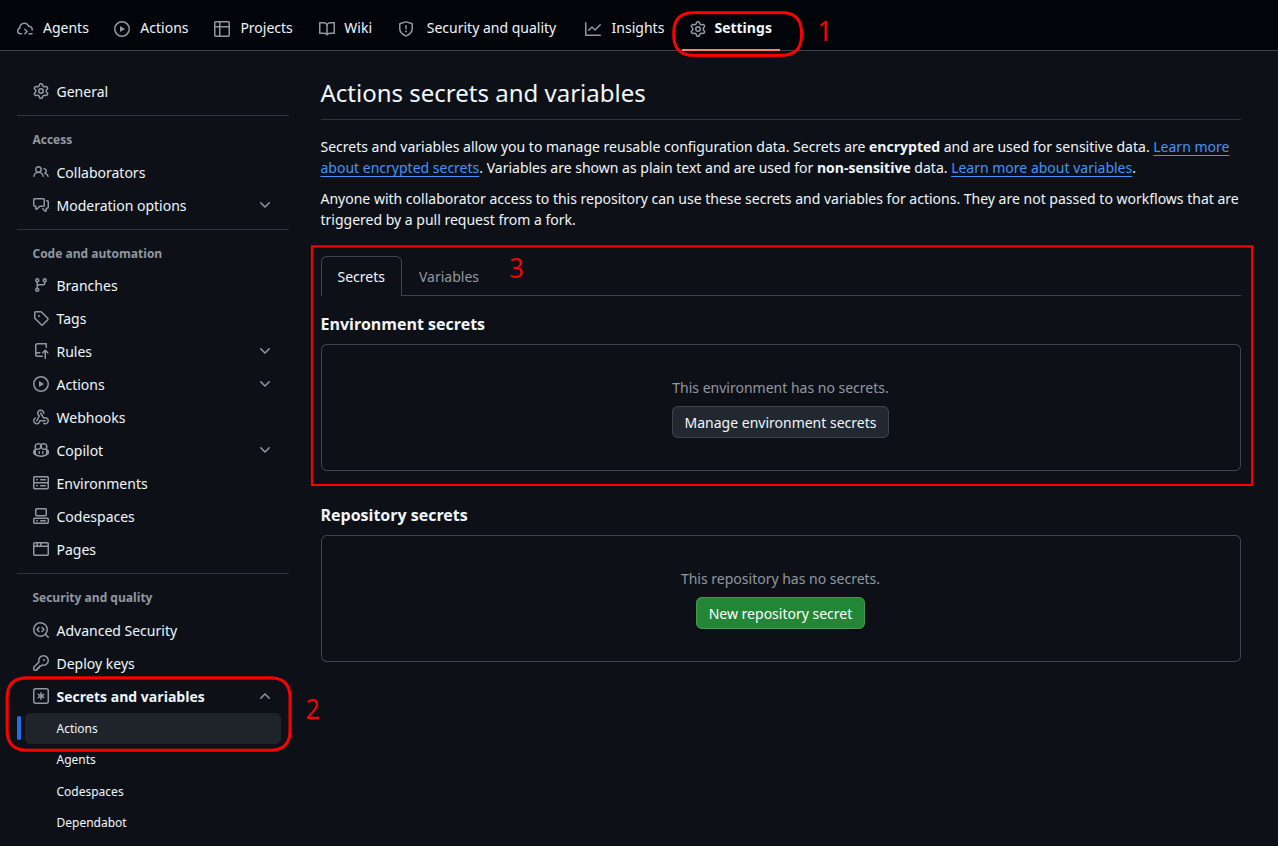
Secrets:
AWS_ACCESS_KEY_ID: AWS access key ID from themjfrigaard-cliIAM user
AWS_SECRET_ACCESS_KEY: AWS secret access key
Variables:
AWS_REGION: AWS region (e.g.,us-east-1)
These credentials belong to the mjfrigaard-cli IAM user with AmazonS3FullAccess permissions (same user for local AWS CLI configuration).
Setting up GitHub Secrets and Variables
%%{init: {'theme': 'base', 'themeVariables': {'fontFamily': 'monospace'}}}%%

graph TD
    Secrets(["GitHub Secrets<br/>(Sensitive)"])
    Vars(["GitHub Variables<br/>(Config)"])

    Secrets --> AccessKey["<strong>AWS_ACCESS_KEY_ID</strong>"]
    Secrets --> SecretKey["<strong>AWS_SECRET_ACCESS_KEY</strong>"]
    Vars --> Region["<strong>AWS_REGION</strong>"]

    AccessKey --> Workflow{{"Workflow Job<br/>(aws-actions/<br>configure-aws-<br>credentials)"}}
    SecretKey --> Workflow
    Region --> Workflow

    Workflow --> S3["Temporary AWS<br/>Credentials"]
    S3 --> Access[["Access to S3"]]

    style Secrets fill:#D2562B,stroke:#000000,stroke-width:1px,color:#ffffff
    style Vars fill:#2A6F77,stroke:#000000,stroke-width:1px,color:#ffffff
    style AccessKey fill:#1B2A41,stroke:#000000,stroke-width:1px,font-size:14px,text-align:center,font-family:monospace,color:#ffffff
    style SecretKey fill:#1B2A41,stroke:#000000,stroke-width:1px,font-size:14px,text-align:center,font-family:monospace,color:#ffffff
    style Region fill:#5B8C5A,stroke:#000000,stroke-width:1px,font-size:14px,text-align:center,font-family:monospace,color:#ffffff
    style Workflow fill:#E8A33D,stroke:#000000,stroke-width:1px,color:#ffffff
    style S3 fill:#2A6F77,stroke:#000000,stroke-width:1px,color:#ffffff
    style Access fill:#5B8C5A,stroke:#000000,stroke-width:1px,color:#ffffff
GitHub Actions Workflow File
Next, we create .github/workflows/publish.yml1 to build and publish the models to our S3 bucket. The models are automatically versioned by vetiver (e.g., 20260710T065220Z-91fdd), so we’re creating a new version in S3 with each workflow run.
name: Publish Models to S3
on:
push:
branches: [lab07-s3]
paths:
- '_labs/lab07/py_model.qmd'
- '_labs/lab07/r_model.qmd'
- '.github/workflows/publish.yml'
jobs:
publish-models:
runs-on: ubuntu-latest
steps:
- name: Check out repository
uses: actions/checkout@v4
- name: Configure AWS credentials
uses: aws-actions/configure-aws-credentials@v4
with:
aws-access-key-id: ${{ secrets.AWS_ACCESS_KEY_ID }}
aws-secret-access-key: ${{ secrets.AWS_SECRET_ACCESS_KEY }}
aws-region: ${{ vars.AWS_REGION || 'us-east-1' }}
- name: Set up Python
uses: actions/setup-python@v5
with:
python-version: '3.12'
- name: Set up R
uses: r-lib/actions/setup-r@v2
with:
r-version: '4.4'
- name: Install Python dependencies
working-directory: ./_labs/lab07
run: |
python -m pip install --upgrade pip
pip install -r Python/requirements.txt pins vetiver python-dotenv
- name: Install R dependencies
working-directory: ./_labs/lab07
run: |
R -e "install.packages(c('vetiver', 'pins', 'plumber2', 'paws.storage'))"
- name: Build and publish Python model
working-directory: ./_labs/lab07
env:
USE_S3: 'true'
AWS_REGION: ${{ vars.AWS_REGION || 'us-east-1' }}
PINS_ALLOW_PICKLE_READ: '1'
run: |
python py_model.py
- name: Build and publish R model
working-directory: ./_labs/lab07
env:
USE_S3: 'true'
AWS_REGION: ${{ vars.AWS_REGION || 'us-east-1' }}
run: |
Rscript r_model.R
- 1
-
Trigger: Runs when
py_model.qmd,r_model.qmd, or this workflow file changes on thelab07-s3branch - 2
-
Checkout: Downloads the latest code from the repository
- 3
-
AWS Auth: Uses
aws-actions/configure-aws-credentialsto set up temporary AWS credentials from GitHub secrets (no long-lived keys stored in the runner)
- 4
-
Setup: Installs Python 3.12 and R 4.4 with required dependencies
- 5
-
Build & Publish: Runs
py_model.pyandr_model.RwithUSE_S3=trueenvironment variable, which causes the model scripts to write directly to S3
Publishing with GitHub Actions automates the model deployment without any permanent AWS credentials sitting in the repository.
Developing on the lab07-s3 Branch
Now, I want to keep the main branch reserved for the Quarto book rendering, so any model changes will go in the lab07-s3 branch (which triggers the model publishing workflow). Since I’ve already been developing on main, I’ll need to create and switch to the lab07-s3 branch:
First I’ll create/check out the lab07-s3 branch from main:
git checkout -b lab07-s3And push the new branch to GitHub:
git push -u origin lab07-s3Once on the lab07-s3 branch, I’ll need to follow this process:
Make changes
Make changes to the model files (i.e., _labs/lab07/py_model.qmd or _labs/lab07/r_model.qmd)
Test changes (locally)
To test changes locally, I’ll need to set the environment variables for S3 (or use local for testing):
export USE_S3=false # or true if testing S3 locallyThen render/run the files with the changes
quarto render py_model.qmd
# or
Rscript r_model.R
Commit changes
Commit the changes (be specific about the files):
git add _labs/lab07/py_model.qmd _labs/lab07/r_model.qmd
git commit -m "Update model configuration or training logic"
Push changes
Push to the lab07-s3 branch:
git push origin lab07-s3GitHub Actions will automatically detects the push to lab07-s3, build the models using the latest code, and publish the versioned models to S3 with AWS credentials from secrets.
Verify
We can verify the models were published using:
# List files in S3
aws s3 ls s3://penguin-vetiver-model-data/ --recursive --profile dev-deploy
Merge to main
Then switch back to the main branch:
git checkout mainThis will merge the changes in lab07-s3 to main (if the changes also belong in the book).
git merge lab07-s3Push changes to main.
git push origin mainThen publish the book:
quarto publish gh-pagesNote that file is stored in the root directory (
.github/workflows/)–where all workflow files belong.↩︎