%%{init: {'theme': 'base', 'themeVariables': { 'fontFamily': 'monospace', "fontSize":"16px", "darkMode":false}}}%%

flowchart TD
    Start(["App-package"]) --> Q1{"Every package<br>runs in webR?"}
    Q1 -->|"yes"| SL("<code>shinylive</code>")
    Q1 -->|"no"| Q2{"Users have R<br>installed?"}
    Q2 -->|"yes"| SYS("<code>system</code>")
    Q2 -->|"no"| Q3{"Heavy system<br>libraries?"}
    Q3 -->|"yes"| CON("<code>container</code>")
    Q3 -->|"no"| Q4{"Internet on<br>first launch?"}
    Q4 -->|"yes"| AD("<code>auto-download</code>")
    Q4 -->|"no"| BUN("<code>bundled</code>")

    style SL fill:#4CBB9D,color:#FFFFFF,rx:5,ry:5
    style SYS fill:#4CBB9D,color:#FFFFFF,rx:5,ry:5
    style CON fill:#4CBB9D,color:#FFFFFF,rx:5,ry:5
    style AD fill:#4CBB9D,color:#FFFFFF,rx:5,ry:5
    style BUN fill:#4CBB9D,color:#FFFFFF,rx:5,ry:5
23 shinyelectron
In the previous chapter we moved our app-package into the browser with webR and shinylive (Chapter 22). Some users need the app as a desktop program instead. They might work offline, or their organization might block unknown websites. In this chapter we’ll use the shinyelectron package to turn sap into an installer that users download and open like any other program.
23.1 What is shinyelectron?
Electron is a framework for building desktop programs with web technologies. An Electron app is just a web browser with a single page, packaged as a program. Visual Studio Code and Slack are both built this way.
shinyelectron wraps a Shiny app in Electron. It starts R (or webR), runs the app, and shows it in a desktop window. The user never sees a browser or a URL.
23.1.1 Choosing a runtime strategy
The app still needs R, and shinyelectron offers five ways to provide it. Each strategy trades installer size against what the user’s computer needs:
| Strategy | The installer ships | The user needs |
|---|---|---|
shinylive |
Electron and a webR bundle |
nothing |
bundled |
Electron and a portable copy of R | nothing |
auto-download |
Electron and a downloader | internet on first launch |
system |
Electron only | R installed |
container |
Electron and a container setup | Docker or Podman |
The diagram below shows how to choose between them:
We confirmed in Section 22.2 that every sap dependency runs in webR, so shinylive is an option. It also needs the R-universe binary from Section 22.3. We’ll use the bundled strategy in this chapter instead. It installs sap from our local source files, so it works without R-universe and runs the full version of R.
The bundled strategy has two limits. Portable R only exists for macOS and Windows, so it can’t build Linux installers. It also can’t cross-build, so macOS installers must be built on a Mac and Windows installers on Windows. We’ll use the shinylive strategy for Linux in Section 23.6.
23.2 Preparing the build machine
You don’t have to know JavaScript to use shinyelectron, but the computer that builds the installer needs a few tools. shinyelectron requires R (>= 4.5.0), Node.js (>= 22.0.0), npm (>= 11.5.0), and each platform’s build tools (Xcode Command Line Tools on macOS or Visual Studio Build Tools on Windows).
We’ll install the development version of shinyelectron from GitHub and check the build machine with sitrep_shinyelectron().
The CRAN release (0.2.1) doesn’t support the local_packages field we’ll use to install sap, so we’ll install teh development version for this chapter:
pak::pak("coatless-rpkg/shinyelectron")
library(shinyelectron)sitrep_shinyelectron()sitrep_shinyelectron()
── Complete shinyelectron Diagnostic Report ──────────────────────────────────
──────────────────────────────────────────────────────────────────────────────
── System Requirements Report ────────────────────────────────────────────────
✔ Platform: mac
✔ Architecture: x64
ℹ Local Node.js (shinyelectron): Not installed
ℹ Install with: `shinyelectron::install_nodejs()`
✔ Active Node.js: v22.14.0 (system)
✔ npm: v11.18.0
✔ R: v4.6.1
── Python ──
✔ Python 3.15.2
ℹ Python shinylive: not usable
ℹ Install with: `pip install shinylive`
ℹ Python shiny: not usable
ℹ Install with: `pip install shiny`
── Container Engine ──
✔ Container engine: docker
── Cached Runtimes ──
✔ Cached R runtimes: 4.6.1
✔ All system requirements satisfiedThe System Requirements Report confirms R, Node.js, and npm meet the minimum versions. The Python section only applies to Shiny for Python apps, and the Container Engine section only applies to the container strategy, so we can ignore both. Cached Runtimes lists the portable R versions shinyelectron has downloaded for the bundled strategy. This list is empty until the first bundled build downloads portable R.
── Dependencies Report ───────────────────────────────────────────────────────

── Required Packages ──

✔ cli: v3.6.6
✔ fs: v2.1.0
✔ jsonlite: v2.0.0
✔ rappdirs: v0.3.4
✔ rlang: v1.3.0
✔ whisker: v0.4.1
✔ processx: v3.9.0
✔ yaml: v2.3.12
✔ utils: v4.6.1
✔ tools: v4.6.1

── Optional Packages ──

✔ shinylive: v0.5.0
ℹ DT: Not installed (optional)
✔ ggplot2: v4.0.3
✔ All required dependencies satisfied

── Recommendations ──

ℹ For full functionality, install optional packages with: install.packages(c("DT"))
The Dependencies Report recommends installing DT, but sap doesn’t use it, so we won’t bother.
── Build Tools Report ────────────────────────────────────────────────────────
ℹ Checking build tools for platform: mac
✔ Xcode Command Line Tools: Found
✔ Build tools ready
The Build Tools Report finds the Xcode Command Line Tools, the build tools shinyelectron requires on macOS. On Windows, this report checks for Visual Studio Build Tools instead.
── Project Report ────────────────────────────────────────────────────────────
ℹ Checking directory: /Users/mjfrigaard/projects/apps/R/sap
✖ package.json: Not found
! main.js: Not found
✖ App files: Not found in src/app or app/
ℹ node_modules: Not found (run 'npm install')
ℹ This does not appear to be an Electron project
! Found 3 issues

── Recommendations ──

ℹ Run 'npm install' to install dependencies
──────────────────────────────────────────────────────────────────────────────

── Overall Summary ───────────────────────────────────────────────────────────
! Found 3 total issues that may prevent successful builds

── Priority Actions ──

ℹ 1. For full functionality, install optional packages with: install.packages(c("DT"))
ℹ 2. Run 'npm install' to install dependencies
The Project Report flags a missing package.json, main.js, and app files because sitrep_shinyelectron() checks the current directory for an Electron project. export() creates that project in electron/dist/electron-app/ during the build, so these issues (and the npm install recommendation) are expected before the first build. The Overall Summary counts these issues, but none of them will stop our build.
This machine already has Node.js v22.14.0 installed (Active Node.js: v22.14.0 (system)), so shinyelectron doesn’t need its own copy. If Node.js is missing or too old, install_nodejs() installs it without administrator rights:
install_nodejs()These tools only matter on the build machine. The people who install our app don’t need R, Node.js, or npm.
23.3 The electron/ folder
shinyelectron exports an app directory, not a package. We’ll keep our package untouched and add an electron/ folder with a launcher app and a build script:
Launch app with the shinypak package:
launch('23.1_shinyelectron')electron/
├── app/
│ ├── _shinyelectron.yml
│ └── app.R
└── build.R23.3.1 The launcher app
The launcher in electron/app/app.R looks just like the shinylive launcher from Section 22.4:
library(shiny)
library(sap)

shinyApp(
  ui = movies_ui(bslib = TRUE),
  server = movies_server
)
We return a Shiny app object for the same reason as before. shinyelectron manages the port and the R process, so the launcher can’t call launch_app() (which calls shiny::runApp()). An app that starts its own server usually opens to a blank window.
23.3.2 The configuration file
_shinyelectron.yml stores the build settings so we don’t have to pass them to export() each time. Arguments passed to export() still override the file:
app:
name: "Movie Reviews"
slug: "sap"
version: "0.0.0-9200"
build:
type: "r-shiny"
runtime_strategy: "bundled"
platforms:
- mac
- win
dependencies:
auto_detect: true
r:
version: null
local_packages:
- "../.."
repos:
- "https://cloud.r-project.org"
window:
width: 1200
height: 800- 1
- The name in the window title and the installed program.
- 2
-
The semantic version form of the
Versionfield inDESCRIPTION(0.0.0.9200). Electron requires three-part versions, so the development number goes after a hyphen. - 3
- Ships a portable copy of R with the app.
- 4
-
Scans
app.Rforlibrary()calls to find dependencies. - 5
-
Installs
sapfrom the package root (relative to this file), with its dependencies fromrepos.
The local_packages field is how a bundled app installs a package that isn’t on CRAN. It accepts a source folder or a .tar.gz file. A local package replaces any repository package with the same name.
23.3.3 Ignoring the build files
The electron/ folder isn’t part of the R package, so we add it to .Rbuildignore. We also add the build output to .gitignore, because the installers are large and we can rebuild them at any time:
^electron$electron/dist/23.4 Building the desktop app (.dmg)
We’ll build the macOS installer (.dmg) on a Mac. The 23.2_shinyelectron-dmg branch narrows the configuration file to a single platform (platforms: mac):
Launch app with the shinypak package:
launch('23.2_shinyelectron-dmg')The build script in electron/build.R checks the system, validates the app, and exports it. We run it from the package root:
library(shinyelectron)

sitrep_shinyelectron()

platform <- "mac"

app_check("electron/app", platform = platform)

export(
  appdir = file.path(getwd(), "electron/app"),
  destdir = file.path(getwd(), "electron/dist"),
  platform = platform,
  overwrite = TRUE,
  run_after = interactive()
)
We pass platform to both app_check() and export(). A bundled build can only target the machine it runs on, so each build gets one platform. Without platform, app_check() reads every platform in the configuration file and reports an error when it finds more than one. app_check() catches configuration problems before the build starts. We pass absolute paths to export(), because the bundled R installs packages from a different working directory and can’t resolve a relative library path.
export() installs portable R, installs sap and its dependencies, and builds the installer. run_after = interactive() opens the finished app when we run the script by hand, but not when it runs on a CI server.
The build prints a lot of output, so we’ll walk through it in three stages. First, export() embeds portable R and installs the dependencies of sap into the bundled library:
ℹ Embedding R runtime for bundled strategy...
ℹ Platform: mac, Architecture: x64
✔ R 4.6.1 already installed at /Users/mjfrigaard/Library/Caches/shinyelectron/assets/r/mac/x64/4.6.1
ℹ Installing packages with bundled R...
ℹ Installing 62 packages into bundled library
Portable R: patched 29 shared libraries
Warning message:
packages ‘methods’, ‘grDevices’, ‘tools’, ‘utils’, ‘graphics’, ‘stats’, ‘grid’ are base packages, and should not be updated
The warning about base packages is harmless.
methods,utils, and the other base packages ship with portable R, so the bundled R skips them.
Next, export() builds a source tarball of sap from the package root (the local_packages field) and installs it:
ℹ Installing 1 local R package with bundled R: sap
ℹ Building a source tarball of sap...
WARNING: ignoring environment value of R_HOME
* checking for file ‘/Users/mjfrigaard/projects/apps/R/sap/DESCRIPTION’ ... OK
* preparing ‘sap’:
* checking DESCRIPTION meta-information ... OK
* checking for LF line-endings in source and make files and shell scripts
* checking for empty or unneeded directories
  NB: this package now depends on R (>= 3.5.0)
  WARNING: Added dependency on R >= 3.5.0 because serialized objects in
  serialize/load version 3 cannot be read in older versions of R.
  File(s) containing such objects:
    ‘sap/data/movies.RData’
    ‘sap/tests/testthat/fixtures/tidy_ggp2_movies.rds’
  NB: this package now depends on R (>= 4.1.0)
  WARNING: Added dependency on R >= 4.1.0 because package code uses the
  pipe |> or function shorthand \(...) syntax added in R 4.1.0.
  File(s) using such syntax:
    ‘display_type.R’ ‘mod_aes_input.R’ ‘mod_var_input.R’
* building ‘sap_0.0.0.9200.tar.gz’

ℹ Installing sap from source...
* installing *source* package ‘sap’ ...
...
* DONE (sap)
✔ Installed sap
ℹ Removed 1012 test and documentation files (32.2 MB) from the bundled R runtime
✔ Embedded R runtime- The
R_HOMEwarning means the bundled R is using its own installation instead of ours, which is what we want.
- The two
NBwarnings are worth fixing:- The
DESCRIPTIONfile ofsapsaysDepends: R (>= 2.10), but the package uses the native pipe (|>) and data saved in serialization version 3 R CMD buildraises the requirement to R (>= 4.1.0) in the tarball, and we can silence the warning by changingDependsto match
- The
Finally, export() installs the Electron dependencies with npm, builds the installer, and (because we ran the script interactively) opens the app:
ℹ Installing npm dependencies...
npm warn deprecated inflight@1.0.6: This module is not supported, and leaks memory. ...
...
16 vulnerabilities (15 moderate, 1 high)
...
npm warn allow-scripts 2 packages have install scripts not yet covered by allowScripts:
npm warn allow-scripts   electron@41.10.7 (postinstall: node install.js)
npm warn allow-scripts   electron-winstaller@5.4.0 (install: node ./script/select-7z-arch.js)
✔ Installed npm dependencies
ℹ Building for platforms: mac
ℹ Building for mac-x64...
✔ Built for mac-x64
✔ Successfully built Electron app: /Users/mjfrigaard/projects/apps/R/sap/electron/dist/electron-app
✔ Successfully exported Shiny application to Electron!
ℹ Output directory: /Users/mjfrigaard/projects/apps/R/sap/electron/dist
ℹ Electron app: /Users/mjfrigaard/projects/apps/R/sap/electron/dist/electron-app
ℹ Distributables: /Users/mjfrigaard/projects/apps/R/sap/electron/dist/electron-app/dist
ℹ Starting application in development mode...
...
[lifecycle] finding_runtime: Looking for R...
[lifecycle] runtime_found: Found bundled R
[lifecycle] starting_server: Starting R Shiny server...
[lifecycle] starting_server: Loading package: shiny
[lifecycle] starting_server: R server listening, loading app...
[lifecycle] server_ready: R Shiny server ready
Server ready on port 3838- The
npmwarnings come from the build tools (electron-builderand its dependencies), not from our app, and they only affect the build machine.
- The
[lifecycle]messages show the app finding the bundled R and starting the Shiny server. In development mode, Electron also prints a Content Security Policy warning and a fewGPUerrors.
- The security warning says it won’t appear once the app is packaged, and the
GPUerrors are Chromium log messages that don’t affect the app.
The installers are written to electron/dist/electron-app/dist/:
electron/dist/electron-app/dist/
├── builder-debug.yml
├── mac/
│   └── Movie Reviews.app
├── sap-0.0.0-9200-x64.dmg
└── sap-0.0.0-9200-x64.dmg.blockmap
On an Intel Mac, the build produces sap-0.0.0-9200-x64.dmg (about 256 MB, most of it portable R). The .dmg is the only file we share with users.
mac/Movie Reviews.appis the unpacked app that goes inside the.dmg, the.blockmapfile is used for automatic updates, andbuilder-debug.ymlrecords theelectron-buildersettings for troubleshooting.
- The window that opens at the end of the build runs in development mode, from the Electron project in
electron/dist/electron-app/(it shows the app works, but not that the installer does).
To check the installer, we open the .dmg, drag Movie Reviews into Applications, and open it like any other program:
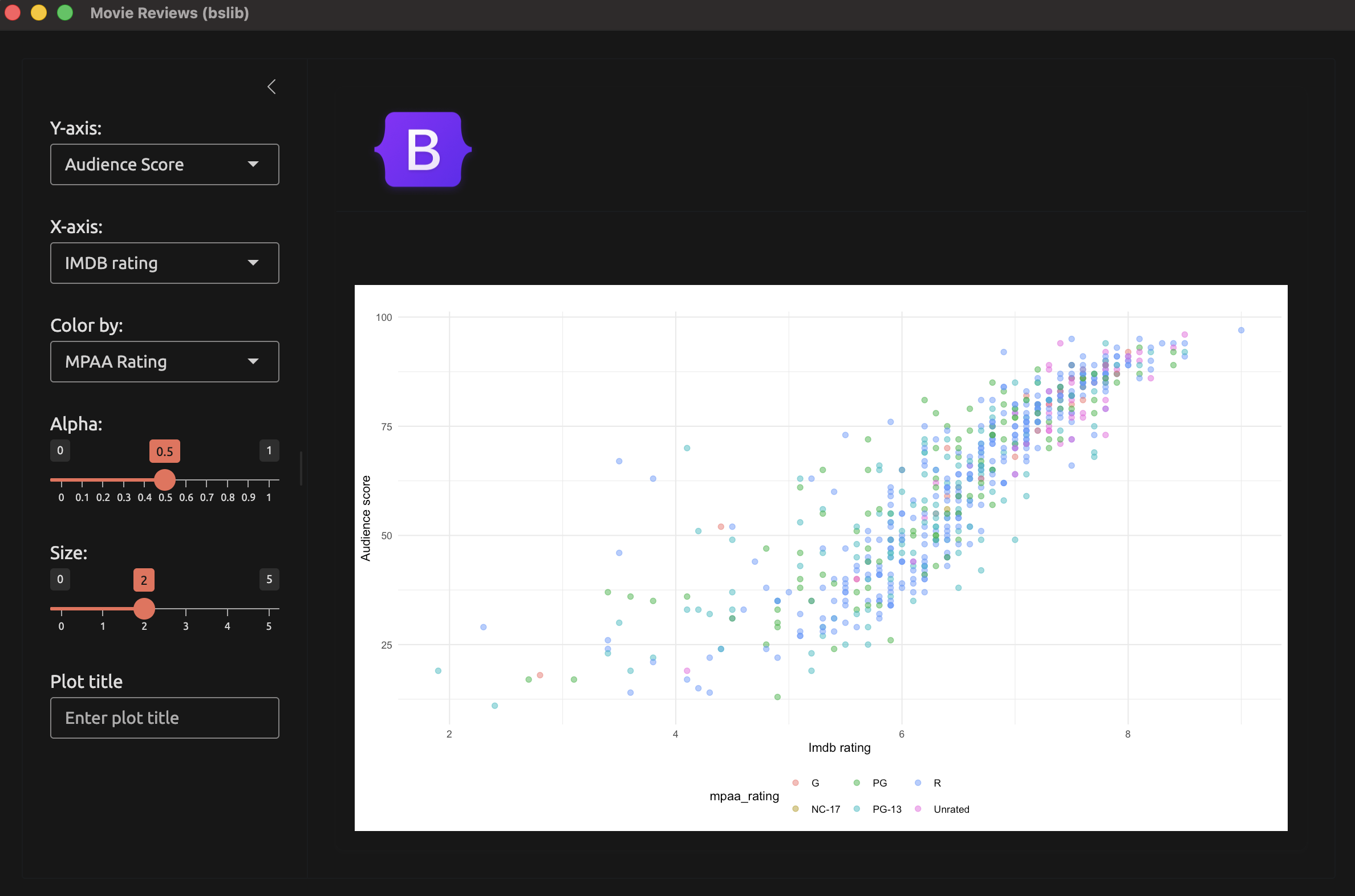
We haven’t configured an icon, so the installed app uses the default Electron icon (app_check() reports Icon: not configured):

23.4.1 Debugging the packaged app
If the packaged app misbehaves, launch it with the SHINYELECTRON_DEBUG environment variable set to 1. The debug output shows how the app found R, which packages it installed, and whether the Shiny server started.
23.5 Building installers with GitHub Actions
Because bundled can’t cross-build, a single computer can’t build installers for every platform. A GitHub Actions matrix solves this by running the same job on a macOS runner and a Windows runner. The workflow is in .github/workflows/build-installers.yml on the 23.1_shinyelectron branch:
name: build-installers, sap
on:
workflow_dispatch:
jobs:
build:
strategy:
fail-fast: false
matrix:
include:
- { os: macos-latest, platform: mac, arch: arm64 }
- { os: windows-latest, platform: win, arch: x64 }
runs-on: ${{ matrix.os }}
steps:
- uses: actions/checkout@v4
- uses: r-lib/actions/setup-r@v2
- uses: r-lib/actions/setup-r-dependencies@v2
with:
extra-packages: local::.
- uses: coatless-actions/shiny-to-electron@v1
with:
appdir: electron/app
app-name: Movie Reviews
platform: ${{ matrix.platform }}
arch: ${{ matrix.arch }}- 1
- Runs only when we start it from the Actions tab.
- 2
-
One job per platform. Linux is left out because
bundledcan’t target it. - 3
-
Installs
sapfrom the checked out repository. - 4
- Builds the Electron installer for the runner’s platform.
workflow_dispatch keeps the workflow from running on every push, since each build takes several minutes per platform. When you’re ready to publish, add a push: tags trigger and a release job that attaches the installers to a GitHub release.
23.6 Building a Linux installer (.deb)
Linux users expect a .deb file, the package format for Debian, Ubuntu, and Pop!_OS (which I’m currently using). shinyelectron doesn’t build a .deb installer, because Linux only builds an .AppImage (a single file that runs without being installed). I’ve found we can still get a .deb by building the .AppImage first, then rebuilding the same Electron project with one extra target.
Launch app with the shinypak package:
launch('23.3_shinyelectron-deb')The bundled strategy won’t work with Pop!_OS, because portable R doesn’t exist for Linux. But we can switch to the shinylive strategy, which runs sap with webR inside the Electron window. The diagram below shows the full build:
%%{init: {'theme': 'base', 'themeVariables': { 'fontFamily': 'monospace', "fontSize":"16px", "darkMode":false}}}%%

flowchart TD
    Start(["<code>electron/build.R</code>"]) -->|"i. export()"| Export("shinyelectron converts the app<br>to shinylive and builds Electron")
    Export --> AppImage[/".AppImage"/]
    Export --> Project[("<code>electron-app/</code><br>Electron project")]
    Project -->|"ii. edit package.json"| Edit("add the <code>deb</code> target,<br>homepage, and maintainer")
    Edit -->|"iii. npx electron-builder"| Builder("electron-builder<br>packages the project")
    Builder --> Deb[/".deb"/]

    style Export fill:#4CBB9D,color:#FFFFFF,rx:5,ry:5
    style Edit fill:#4CBB9D,color:#FFFFFF,rx:5,ry:5
    style Builder fill:#4CBB9D,color:#FFFFFF,rx:5,ry:5
23.6.1 Preparing the Linux build machine
The Linux build machine needs the same tools as before. The default Node.js on Ubuntu 24.04 (and Pop!_OS) is version 18, which is too old for shinyelectron.
library(shinyelectron)install_nodejs() installs a newer version without administrator rights:
install_nodejs()ℹ Detecting latest Node.js LTS version...
✔ Latest LTS: v26.13.0
── Installing Node.js v26.13.0 ─────────────────────────────────────────────
ℹ Platform: linux
ℹ Architecture: x64
ℹ Fetching checksums...
ℹ Downloading from <https://nodejs.org/dist/v26.13.0/node-v26.13.0-linux-x64.tar.gz>
trying URL 'https://nodejs.org/dist/v26.13.0/node-v26.13.0-linux-x64.tar.gz'
Content type 'application/gzip' length 62893692 bytes (60.0 MB)
==================================================
downloaded 60.0 MB
ℹ Verifying checksum...
✔ Checksum verified
ℹ Extracting archive...
✔ Node.js v26.13.0 installed successfully
ℹ Location: /home/mjfrigaard/.cache/shinyelectron/assets/nodejs/v26.13.0/linux-x64
ℹ shinyelectron will automatically use this installationThe shinylive strategy needs two things from Chapter 22. The first is the shinylive R package, which converts the app before Electron packages it. sitrep_shinyelectron() lists shinylive as optional, but this strategy can’t build without it:
install.packages("shinylive")The second is the WebAssembly binary of sap from Section 22.3. We install sap from R-universe before we build:
install.packages(
  "sap",
  repos = c("https://mjfrigaard.r-universe.dev", getOption("repos"))
)
We can confirm the build machine is ready with sitrep_shinyelectron().
sitrep_shinyelectron()The System Requirements Report shows shinyelectron is using the local copy of Node.js we installed with install_nodejs() (Active Node.js: v26.13.0 (local)). Cached Runtimes reports no cached runtimes, which is expected because the shinylive strategy runs sap with webR and never downloads portable R.
The Dependencies Report confirms the required packages are installed. The Optional Packages section should now list shinylive with a version number:
── Complete shinyelectron Diagnostic Report ────────────────────────────────
────────────────────────────────────────────────────────────────────────────

── System Requirements Report ──────────────────────────────────────────────
✔ Platform: linux
✔ Architecture: x64
✔ Local Node.js (shinyelectron): v26.13.0
✔ Active Node.js: v26.13.0 (local)
✔ npm: v11.20.0
✔ R: v4.6.1

── Python ──

✔ Python 3.12.3
ℹ Python shinylive: not usable
ℹ   Install with: `pip install shinylive`
ℹ Python shiny: not usable
ℹ   Install with: `pip install shiny`

── Container Engine ──

✔ Container engine: docker

── Cached Runtimes ──

ℹ No cached runtimes found
✔ All system requirements satisfied
────────────────────────────────────────────────────────────────────────────

── Dependencies Report ─────────────────────────────────────────────────────

── Required Packages ──

✔ cli: v3.6.6
✔ fs: v2.1.0
✔ jsonlite: v2.0.0
✔ rappdirs: v0.3.4
✔ rlang: v1.3.0
✔ whisker: v0.4.1
✔ processx: v3.9.0
✔ yaml: v2.3.12
✔ utils: v4.6.1
✔ tools: v4.6.1

── Optional Packages ──

✔ shinylive: v0.5.0
✔ DT: v0.34.0
✔ ggplot2: v4.0.3
✔ All required dependencies satisfied
────────────────────────────────────────────────────────────────────────────
The Build Tools Report finds gcc and make, and the Project Report flags the same missing Electron project files we saw in Section 23.2:
── Build Tools Report ──────────────────────────────────────────────────────
ℹ Checking build tools for platform: linux
✔ Build tools (gcc, make): Found
✔ Build tools ready
────────────────────────────────────────────────────────────────────────────

── Project Report ──────────────────────────────────────────────────────────
ℹ Checking directory: /home/mjfrigaard/projects/apps/R/sap
✖ package.json: Not found
! main.js: Not found
✖ App files: Not found in src/app or app/
ℹ node_modules: Not found (run 'npm install')
ℹ This does not appear to be an Electron project
! Found 3 issues

── Recommendations ──

ℹ Run 'npm install' to install dependencies
────────────────────────────────────────────────────────────────────────────

── Overall Summary ─────────────────────────────────────────────────────────
! Found 3 total issues that may prevent successful builds

── Priority Actions ──

ℹ 1. Run 'npm install' to install dependencies23.6.2 The Linux configuration file
The launcher in electron/app/app.R doesn’t change. The configuration file switches the strategy and the platform:
app:
name: "Movie Reviews"
slug: "sap"
version: "0.0.0-9200"
build:
type: "r-shiny"
runtime_strategy: "shinylive"
platforms:
- linux
window:
width: 1200
height: 800- 1
-
Runs
sapwithwebR, so the installer doesn’t need portable R. - 2
- Builds for Linux only.
We’ve dropped the dependencies block. The shinylive strategy bundles the WebAssembly binaries of the installed packages, so it doesn’t install anything from local_packages.
23.6.3 The Linux build script
The build script in electron/build.R runs in two stages. export() builds the .AppImage, then the script edits the Electron project and calls electron-builder to build the .deb:
library(shinyelectron)
sitrep_shinyelectron()
app_check("electron/app", platform = "linux")
export(
appdir = file.path(getwd(), "electron/app"),
destdir = file.path(getwd(), "electron/dist"),
platform = "linux",
overwrite = TRUE
)
electron_app <- file.path(getwd(), "electron/dist/electron-app")
pkg_json <- file.path(electron_app, "package.json")
pkg <- jsonlite::read_json(pkg_json)
pkg$homepage <- "https://github.com/mjfrigaard/sap"
pkg$build$linux$target <- list("AppImage", "deb")
pkg$build$linux$maintainer <- "Martin Frigaard <mjfrigaard@pm.me>"
jsonlite::write_json(pkg, pkg_json, auto_unbox = TRUE, pretty = TRUE)
node_bin <- utils::tail(Sys.glob(file.path(
rappdirs::user_cache_dir("shinyelectron"), "assets/nodejs/*/linux-x64/bin"
)), 1)
withr::with_path(node_bin, withr::with_dir(
electron_app,
system2("npx", c("electron-builder", "--linux", "deb", "--publish", "never"))
))- 1
-
Converts the app to
shinylive, writes the Electron project toelectron/dist/electron-app/, and builds the.AppImage. - 2
-
The project’s web page, required for a
.deb. - 3
-
Adds
debto the Linux targets (shinyelectrononly setsAppImage). - 4
-
The package maintainer, also required for a
.deb. - 5
-
Finds the Node.js that
install_nodejs()installed in theshinyelectroncache. - 6
-
Puts that Node.js first on the
PATH, then runselectron-builderfrom inside the Electron project. Without it,npxuses the system Node.js (version 18 on Ubuntu 24.04).
We can’t skip the first build with export(build = FALSE). That option stops after the shinylive conversion, before shinyelectron writes the Electron project, so there’s no package.json to edit.
The homepage and maintainer fields matter because electron-builder refuses to build a .deb without them:
Error: Please specify project homepage
Please specify author 'email' in the application package.json
It is required to set Linux .deb package maintainer.23.6.4 Checking the .deb
The installers are written to electron/dist/electron-app/dist/:
sap-0.0.0-9200-amd64.deb          183 MB
sap-0.0.0-9200-x86_64.AppImage    211 MB
We can confirm the package details before we install it with dpkg-deb:
dpkg-deb -f electron/dist/electron-app/dist/sap-0.0.0-9200-amd64.deb \
  Package Version Architecture Maintainer Homepage
Package: sap
Version: 0.0.0~9200
Architecture: amd64
Maintainer: Martin Frigaard <mjfrigaard@pm.me>
Homepage: https://github.com/mjfrigaard/sapelectron-builder converts the hyphen in our version to a tilde (0.0.0~9200), which Debian reads as a pre-release version.
23.6.5 Installing the .deb
We install the package with dpkg, which needs administrator rights. Run this from the package root:
sudo dpkg -i electron/dist/electron-app/dist/sap-0.0.0-9200-amd64.debSelecting previously unselected package sap.
(Reading database… 479036 files and directories currently installed.)
Preparing to unpack …/dist/sap-0.0.0-9200-amd64.deb…
Unpacking sap (0.0.0~9200)…
Setting up sap (0.0.0~9200)…
update-alternatives: using /opt/Movie Reviews/sap to provide /usr/bin/sap (sap) in auto mode
Processing triggers for desktop-file-utils (0.27-2build1)…
Processing triggers for gnome-menus (3.36.0-1.1ubuntu3)…
Processing triggers for hicolor-icon-theme (0.17-2)…The app installs to /opt/Movie Reviews/ and adds Movie Reviews to the Applications launcher:
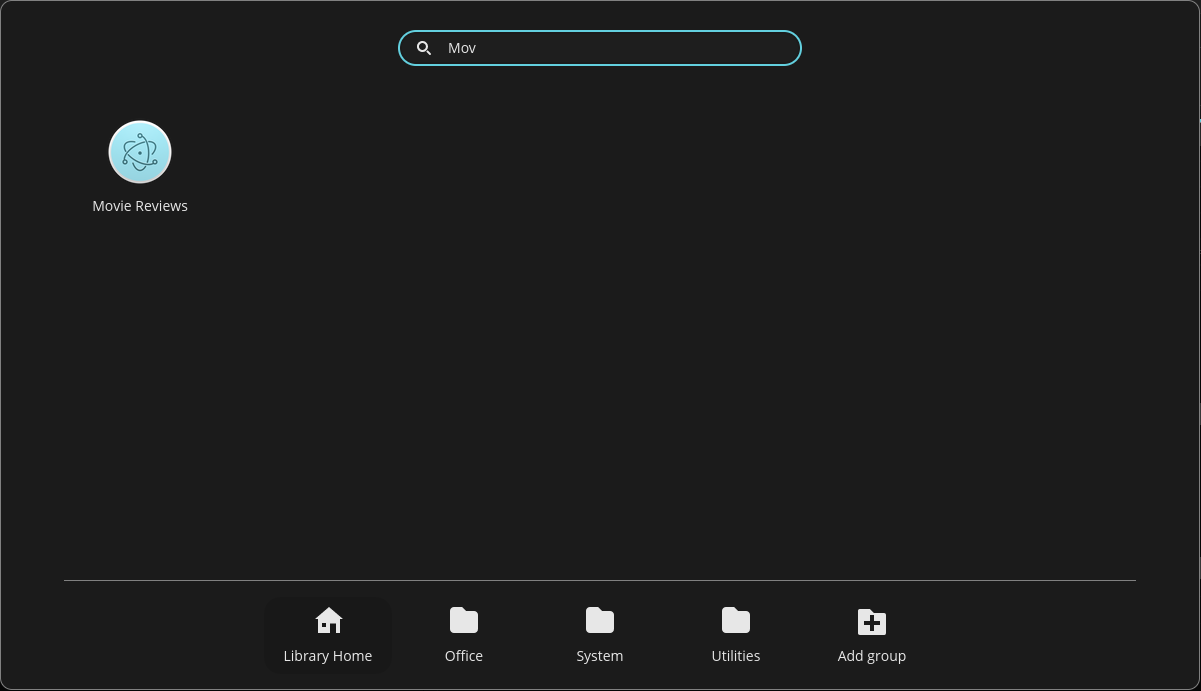
The update-alternatives line in the output also adds a sap command, so we can start the app from a terminal by typing sap.
The first launch takes a few seconds while webR loads sap and its dependencies. We can confirm it worked when the scatter plot appears in the window.
We remove the app with the package name from the Package field. The -P (purge) option removes the app and dpkg’s record of it in one step:
sudo dpkg -P sap(Reading database… 479120 files and directories currently installed.)
Removing sap (0.0.0~9200)…
update-alternatives: warning: alternative /opt/Movie Reviews/sap (part of link group sap) doesn't exist; removing from list of alternatives
update-alternatives: warning: /etc/alternatives/sap is dangling; it will be updated with best choice
Purging configuration files for sap (0.0.0~9200)…
Processing triggers for hicolor-icon-theme (0.17-2)…
Processing triggers for desktop-file-utils (0.27-2build1)…
Processing triggers for gnome-menus (3.36.0-1.1ubuntu3)…The two update-alternatives warnings are expected. The package’s removal script cleans up the sap command after dpkg has already deleted the app’s files, so it warns about the missing files and then removes the link anyway.
Recap
shinyelectron turns our app-package into a desktop program without changing the package itself. All the desktop code lives in the electron/ folder.
In the next chapter we’ll build a package website for sap with pkgdown (Chapter 24).