20 Overlapping frequency polygons
TipTheme:
theme_supersoaker()
Graphs in this chapter use fmggp2::theme_supersoaker(), modeled on a Super Soaker: neon orange plastic, a water blue plot area, neon green, purple, and blue marks, and an Arial Black title.
20.1 Description
Overlapping frequency polygons are similar to overlapping histograms: they allow us to compare distributions of a continuous variable across the levels of a categorical variable.
Instead of using bars, frequency polygons use lines to show the shape of the distribution.
20.2 Set up
PACKAGES:
Install packages.
show/hide
library(ggplot2)
library(dplyr) # for tibble() and data manipulation
DATA:
Every summer in the early 90s, backyard water fights were won by whoever had the biggest Super Soaker. We’ll simulate 200 shots from each of three models. Each model gets its own average range (avg_range). rnorm() draws each shot’s range with a standard deviation equal to 12% of that average, so the more powerful models also spray a wider spread of distances. Setting the seed with set.seed() means you’ll get the same 600 shots every time you run the code below.
show/hide
set.seed(1990) # same 600 shots every time the code runs
soaker_shots <- tibble(
  shot_id = 1:600, # 600 different shots, one row each
  model = rep(c("SS 50", "SS 100", "CPS 2000"), each = 200) # 200 shots per model
  ) |>
  mutate(
    model = factor(model, levels = c("SS 50", "SS 100", "CPS 2000")), # shortest to longest range
    avg_range = c(`SS 50` = 25, `SS 100` = 35, # average range in feet
                  `CPS 2000` = 45)[as.character(model)], # (looked up for each model)
    range_ft = round(
      rnorm(n(), mean = avg_range,
            sd = 0.12 * avg_range), # bigger soakers spread out more
      1 # one decimal place
      )
    ) |>
  select(shot_id, model, range_ft)
glimpse(soaker_shots)
#> Rows: 600
#> Columns: 3
#> $ shot_id  <int> 1, 2, 3, 4, 5, 6, 7, 8, 9, 10, …
#> $ model    <fct> SS 50, SS 50, SS 50, SS 50, SS …
#> $ range_ft <dbl> 22.2, 25.7, 22.7, 25.3, 23.5, 3…
20.3 Distribution
Overlapping frequency polygons make it easy to compare where groups sit and how spread out they are. In this simulation, both of those change together: a bigger Super Soaker shoots further on average and less consistently. Below we’ll move from the shots, to a picture, to the formula.
COUNT IT:
Start with the first five shots (all from the SS 50).
show/hide
head(soaker_shots, 5)These shots landed between about 22 and 26 feet. The summary below shows that the standard deviation (sd) grows with the mean, but the ratio of the two (cv, the coefficient of variation) stays close to 0.12 for every model.
show/hide
soaker_shots |>
  group_by(model) |>
  summarise(mean = mean(range_ft), sd = sd(range_ft), cv = sd / mean)
DRAW IT:
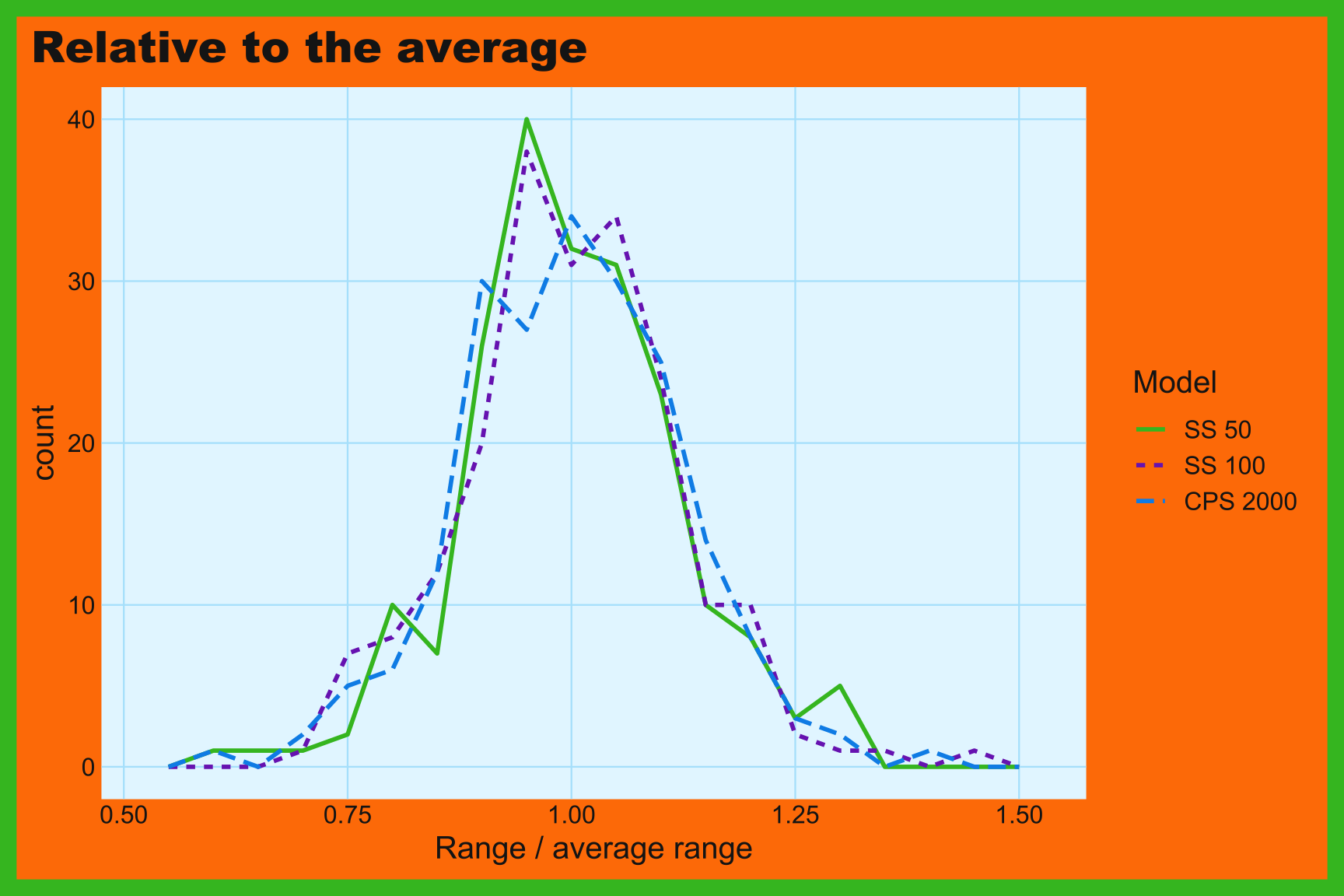
The first graph below shows the three polygons in feet. Each one sits further to the right than the last, and each one is lower and wider. The second graph divides every shot by its model’s average range, which puts all three on the same relative scale. Once we do that, the three polygons line up on top of each other, because they all have the same shape.
show/hide
ggplot(soaker_shots, aes(x = range_ft, color = model, linetype = model)) +
  geom_freqpoly(binwidth = 2, linewidth = 1) +
  labs(title = "Feet", x = "Range (feet)", color = "Model",
    linetype = "Model")

soaker_shots |>
  group_by(model) |>
  mutate(relative_range = range_ft / mean(range_ft)) |>
  ggplot(aes(x = relative_range, color = model, linetype = model)) +
  geom_freqpoly(binwidth = 0.05, linewidth = 1) +
  labs(title = "Relative to the average",
    x = "Range / average range", color = "Model", linetype = "Model")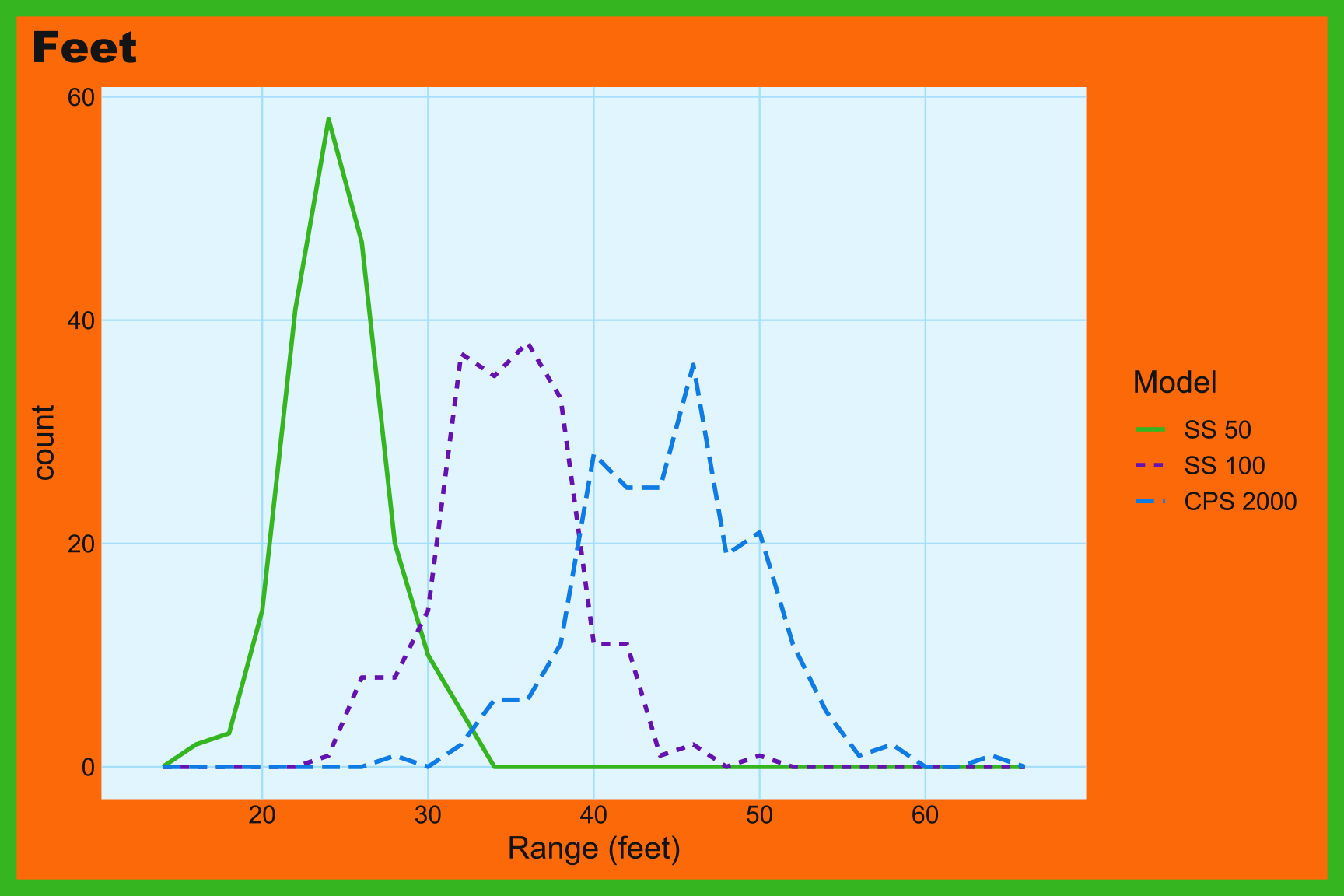
NAME IT:
Each model’s shots come from a normal distribution whose standard deviation is a fixed fraction of its mean:
\[ X_m \sim \text{Normal}(\mu_m, \; 0.12\,\mu_m), \quad \mu = (25, 35, 45) \]
Dividing by the mean removes the difference between models: \(X_m / \mu_m \sim \text{Normal}(1, 0.12)\) for every model, which is why the relative polygons line up. A 12% spread is about 3 feet for the SS 50 but more than 5 feet for the CPS 2000, so the CPS 2000’s polygon is wider and, with the same 200 shots, lower. Try giving every model the same sd in rnorm() (say, 4 feet) and the three polygons in the first graph will all have the same width.
20.4 Grammar
CODE:
Create labels with
labs()Initialize the graph with
ggplot()and providedataMap
range_ftto thexMap
modelto thecolorandlinetypeaesthetics insidegeom_freqpoly(),1 and setbinwidthto2andlinewidthto1
show/hide
labs_ovrlp_freq_poly <- labs(
  title = "Super Soaker range",
  caption = "Simulated data",
  subtitle = "200 shots from each model",
  x = "Range (feet)",
  color = "Model",
  linetype = "Model")
ggp2_ovrlp_freq_poly <- ggplot(data = soaker_shots,
       aes(x = range_ft)) +
  geom_freqpoly(aes(color = model, linetype = model),
    binwidth = 2, linewidth = 1)
ggp2_ovrlp_freq_poly +
  labs_ovrlp_freq_poly
GRAPH:
Mapping
modelto bothcolorandlinetypekeeps the groups apart in grayscale and for colorblind readers. Giving both the same title inlabs()merges them into one legend.↩︎